
Introduction
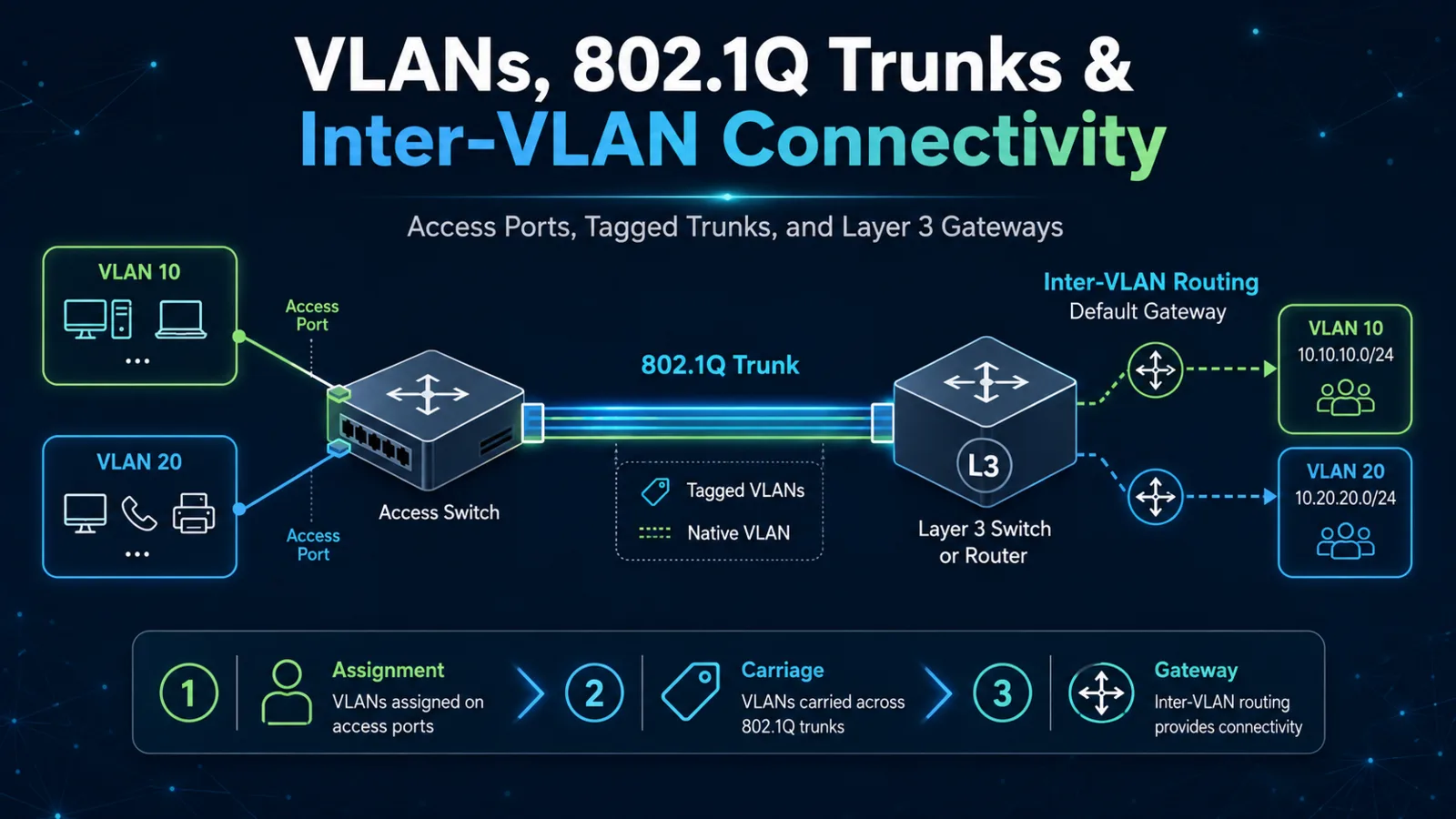
A virtual local area network (VLAN) creates a Layer 2 broadcast domain. Access ports place endpoint traffic into one VLAN, trunks carry multiple VLANs between infrastructure devices, and a Layer 3 interface routes between VLANs. End-to-end connectivity requires all three functions to agree.
Architecture Overview
An access port normally sends and receives untagged frames for its assigned data VLAN. A voice VLAN can provide a separate logical segment for an attached IP phone while the connected workstation uses the data VLAN. The default VLAN is a platform-defined initial VLAN; it should not be confused with the native VLAN on a trunk.
IEEE 802.1Q inserts a VLAN tag into Ethernet frames on a trunk. Native-VLAN traffic is typically untagged, making native-VLAN consistency important on both ends. Allowed-VLAN lists further control which tagged VLANs may traverse the link.
Core Components
Access, Trunk, and Layer 3 Boundaries
The access port assigns the local endpoint to a VLAN. The trunk preserves VLAN identity across switches. Inter-VLAN connectivity requires a router subinterface or a switched virtual interface on a Layer 3 switch, with an address that endpoints can use as their default gateway.
A VLAN may exist in the database yet still have no forwarding path. Conversely, a trunk can be operational while pruning or failing to allow the required VLAN. Always distinguish existence, port membership, trunk carriage, Layer 3 interface state, and routing.
How Components Work Together
For two hosts in the same VLAN, switches learn their source Media Access Control addresses and forward frames locally. For hosts in different VLANs, the sender addresses the frame to its default gateway. The Layer 3 device removes the original frame, makes a routing decision, and builds a new frame for the destination VLAN.
Design Considerations
Limit VLANs to the links that need them, keep native-VLAN settings consistent, and document gateway ownership. Before changing trunks remotely, confirm that the management VLAN will remain reachable. A mistaken allowed list or native VLAN can disconnect the session used to make the repair.
Best Practices
- Verify VLAN existence and active access-port membership.
- Compare both ends of every trunk.
- Confirm operational trunking and allowed VLANs, not only configured commands.
- Check gateway interface state and endpoint default gateways.
- Use an explicit change and recovery plan for remote trunk modifications.
Common Mistakes
Frequent errors include assigning the wrong access VLAN, allowing a VLAN on only one trunk end, using mismatched native VLANs, leaving a switched virtual interface down because no active member port exists, and troubleshooting routing before proving Layer 2 carriage.
Certification Relevance
CCNA v1.1 includes normal-range VLAN configuration, data and voice access ports, the default VLAN, inter-VLAN connectivity, trunks, IEEE 802.1Q, and the native VLAN. The key skill is tracing VLAN identity from endpoint port through trunk to the Layer 3 gateway.
Conclusion
VLAN troubleshooting is a continuity check. Prove assignment, carriage, and gateway service in that order, and treat configured and operational state as separate evidence.