
Introduction
A router forwards a packet by matching its destination against installed routes. Understanding the routing table prevents a common mistake: treating the configuration as proof that a route is usable. The operational table shows which routes won selection and can participate in forwarding.
Architecture Overview
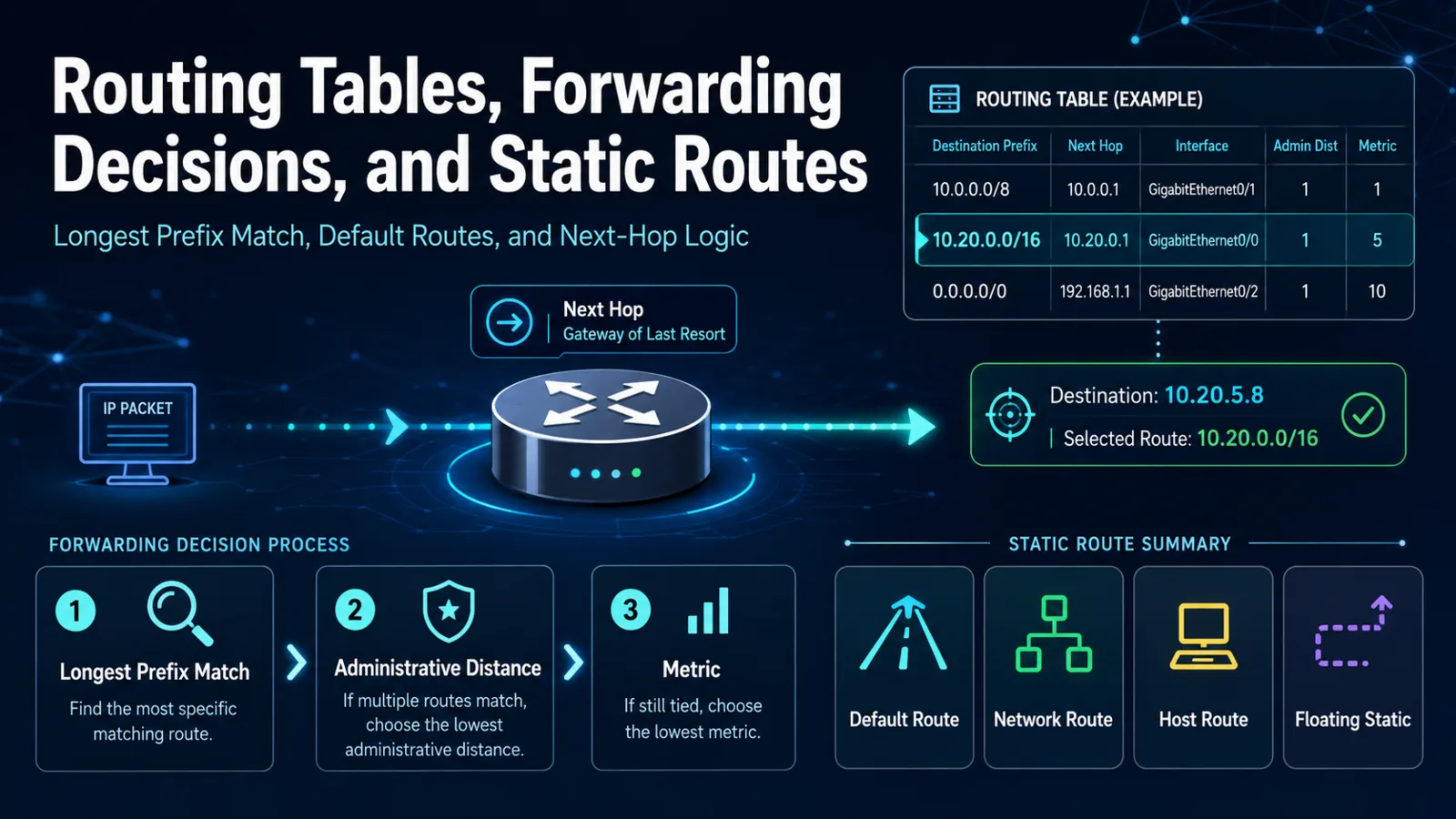
A routing-table entry identifies a prefix and normally includes a source code, next hop or outgoing interface, administrative distance, and metric. A gateway of last resort supplies the default path when no more-specific route matches.
The forwarding decision follows three separate comparisons. Longest prefix match chooses the most-specific matching prefix. If multiple sources offer the same prefix, administrative distance ranks the source type. A routing protocol's metric then selects among comparable paths learned by that protocol. Administrative distance is not compared between different prefix lengths.
Core Components
Static Route Types
A default route matches destinations not covered by more-specific entries. A network route covers a prefix, while a host route matches one address. A floating static route uses a less-preferred administrative distance so that it can become active when a preferred route disappears.
IPv4 and IPv6 static routes may identify a next hop, an outgoing interface, or both, depending on link type and platform. A configured next hop must be recursively resolvable or directly reachable before the route can normally be installed.
How Forwarding Works
Suppose a table contains 10.0.0.0/8, 10.20.0.0/16, and 0.0.0.0/0. Traffic for 10.20.5.8 uses the /16 entry even if the /8 route has a numerically lower administrative distance. The prefix comparison happens first.
After route selection, the router resolves the Layer 2 adjacency on the outgoing link, decrements the packet's lifetime field, and constructs a new local frame. A valid route can therefore coexist with a neighbor-resolution or return-path failure.
Design Considerations
Use static routes where the topology is stable and operational ownership is clear. Document next-hop dependencies and return paths. For floating routes, confirm that their administrative distance is less preferred than the primary source and test both failure and restoration.
Best Practices
- Inspect the operational route table for the exact destination.
- Compare prefix length before administrative distance or metric.
- Verify next-hop reachability and the outgoing interface.
- Check the reverse route when one-way traffic is possible.
- Use controlled failure tests for backup routes.
Common Mistakes
Frequent mistakes include checking only the running configuration, selecting the lowest metric across different prefixes, expecting a floating route to appear as active beside the primary, and blaming routing when an access control list or neighbor-resolution failure blocks the packet.
Certification Relevance
CCNA v1.1 requires routing-table interpretation, default forwarding logic, and IPv4/IPv6 static-route configuration and verification, including default, network, host, and floating static routes.
Conclusion
Predict forwarding from the installed table: longest prefix first, then source preference, then protocol metric. Follow that with next-hop and return-path validation.