
Introduction
VMware vSphere Kubernetes Service (VKS) troubleshooting requires more than checking whether a Kubernetes Pod is running. A VKS environment spans VMware Cloud Foundation (VCF), the vSphere Supervisor, vSphere Namespaces, VKS cluster nodes, Kubernetes services, and application workloads. A failure reported at one layer may originate in another.
For example, a VKS cluster that remains in a provisioning state might be blocked by an unavailable virtual machine (VM) class, insufficient capacity, inaccessible release content, a network dependency, or a storage policy. A workload that cannot start might instead point to image registry trust, persistent storage, scheduling, or node health. Effective analysis begins by identifying the affected layer and following its dependencies.
This guide uses VMware Cloud Foundation 9.0 as its baseline. It presents a repeatable method for analyzing common VKS failures without assuming that one symptom always has one cause. Product behavior and remediation can vary by VKS and vSphere Supervisor release, so any corrective action must be validated against version-matched Broadcom documentation and knowledge base guidance.
Troubleshooting Methodology
Start by defining the incident precisely. Record the first observed symptom, affected users or clusters, time of onset, recent configuration changes, and whether the issue is continuous or intermittent. Separate the visible symptom from the suspected cause. “Cluster creation is incomplete” is an observation; “the network is broken” is only a hypothesis until evidence supports it.
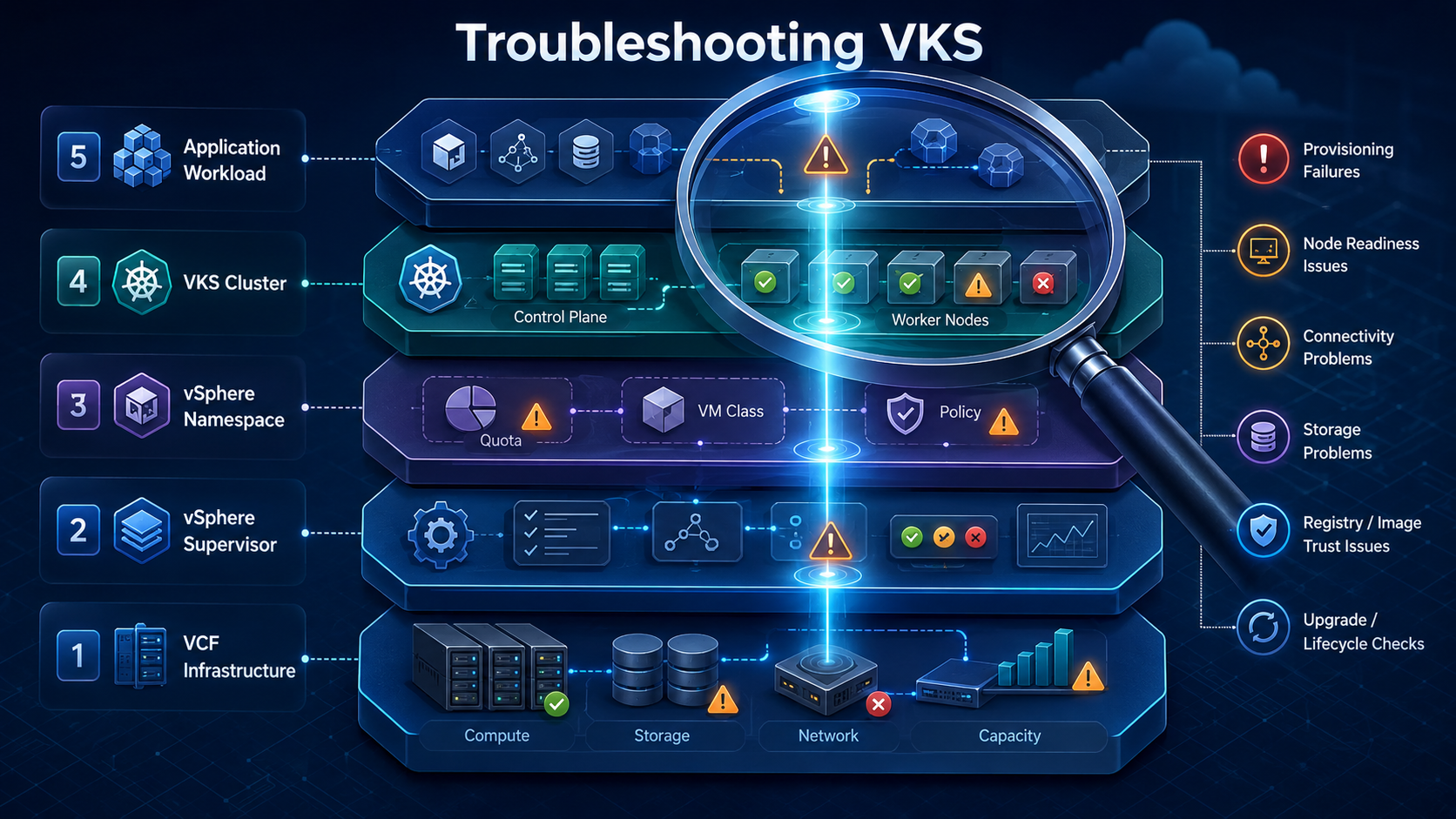
Next, determine the failure domain. A practical VKS troubleshooting model uses five layers:
| Layer | Questions to ask | Useful evidence |
|---|---|---|
| VMware Cloud Foundation infrastructure | Are hosts, vCenter Server, networking, storage, and capacity healthy? | Infrastructure alarms, tasks, events, capacity, datastore health, and network status |
| vSphere Supervisor | Is the Supervisor healthy and reconciling the requested resource? | Supervisor health, resource conditions, service state, controller events, and task history |
| vSphere Namespace | Are permissions, quotas, VM classes, storage policies, release content, and networking available? | Namespace configuration, assigned policies, limits, permissions, and object conditions |
| VKS cluster | Are control plane and worker nodes available, and is the Kubernetes API reachable? | Cluster conditions, node status, Kubernetes events, system Pods, and component health |
| Application workload | Can the workload schedule, start, reach dependencies, and attach storage? | Pod conditions, logs, events, Services, endpoints, persistent volume claims, and application telemetry |
The official VMware namespace hierarchy guidance reinforces the need to distinguish the vSphere Namespace resource boundary from Kubernetes namespaces inside a VKS cluster. Checking the wrong namespace layer can produce valid data that is irrelevant to the actual failure.
Compare desired state with observed state at the affected layer. A cluster declaration describes what the Supervisor should create; its conditions and events show what the platform has observed. A Kubernetes Deployment describes the required replicas; Pod and node conditions show why that desired state has not been reached. This comparison is more reliable than restarting components before the failure state is understood.
Collect evidence before making changes. Preserve timestamps, status conditions, recent events, relevant logs, failed task details, and the configuration that produced the issue. If multiple teams are involved, establish one incident timeline so that Kubernetes, network, storage, and vSphere events can be correlated.
Common Issues
VKS incidents commonly fall into provisioning, node health, connectivity, storage, access, content, trust, lifecycle, or performance categories. The same symptom may cross several categories, so the initial classification should guide investigation rather than predetermine the answer.
Issue Analysis
| Symptom | First analysis boundary | Evidence to examine |
|---|---|---|
| VKS cluster provisioning does not complete | vSphere Namespace and vSphere Supervisor | Cluster conditions, VM class availability, quota, capacity, vSphere Kubernetes release (VKr) availability, tasks, and events |
| Control plane or worker node is NotReady | VKS cluster and backing VM | Node conditions, system Pods, VM power and guest state, network reachability, time synchronization, and recent node changes |
| User cannot reach or authenticate to an API | Access path and identity layer | Current context, endpoint reachability, certificate validity, identity provider state, namespace permissions, and Role-Based Access Control (RBAC) |
| Pods cannot communicate or a Service is unreachable | Workload and cluster networking | Pod placement, endpoints, address pools, routes, policies, Domain Name System (DNS), load balancer state, and Container Network Interface (CNI) health |
| Persistent volume claim remains pending or attachment fails | Kubernetes storage and vSphere storage | Storage class, claim events, vSphere Storage Policy assignment, datastore capacity and health, VMware vSAN health where applicable, topology, and vSphere Container Storage Interface (CSI) Driver state |
| Image pull or registry operation fails | Registry access and trust | Image reference, credentials, network path, DNS, Transport Layer Security (TLS) certificate chain, and trusted Certificate Authority (CA) configuration |
| Upgrade or configuration change stalls | Lifecycle and compatibility layer | Current and target versions, supported upgrade path, release content, available capacity, node health, conditions, and recent changes |
| Cluster or workload performance degrades | Application, Kubernetes, and infrastructure layers | Resource requests and limits, node utilization, scheduling, throttling, latency, storage and network metrics, and infrastructure contention |
For provisioning failures, verify the vSphere Namespace before focusing on the workload cluster. The namespace must expose the required infrastructure choices, and the Supervisor must be able to satisfy them. A valid cluster specification can still fail if the selected VM class is unavailable, quota is exhausted, the VKr is not accessible, placement cannot be satisfied, or a network or storage dependency is unhealthy.
For node failures, distinguish an unavailable VM from a running VM whose Kubernetes node is unhealthy. A powered-on worker VM does not prove that the kubelet, container runtime, CNI, or required system Pods are healthy. Conversely, a Kubernetes NotReady condition does not prove that the VM itself has failed. Compare both views and align them by node and timestamp.
For networking failures, trace a complete path instead of testing only one endpoint. Determine whether the failure affects the Kubernetes API, node-to-node traffic, Pod traffic, Service exposure, ingress, egress, or name resolution. The relevant infrastructure may include VMware NSX, an NSX Virtual Private Cloud (VPC), an NSX Segment, a vSphere Distributed Switch (VDS), and a supported load-balancing solution such as VMware Avi Load Balancer. The deployed topology determines which components belong in the path.
For storage failures, follow the request from the persistent volume claim to the storage class, vSphere Storage Policy, persistent volume, backing datastore, and attachment target. This sequence distinguishes Kubernetes scheduling or claim problems from policy, capacity, topology, datastore, or CSI integration failures.
Root Cause Considerations
Provisioning root causes often involve dependencies rather than invalid Kubernetes syntax. Check whether the Supervisor is healthy, the namespace has sufficient quota, the requested VM class and VKr are available, hosts can satisfy placement, and the configured network and storage services are ready. A condition message or failed vCenter Server task can narrow the investigation to one dependency.
Connectivity failures should be separated into reachability, name resolution, authentication, authorization, and service-discovery problems. These categories can look similar from a client. A timeout usually suggests a different path than a certificate rejection, an authentication failure, an RBAC denial, or a Service with no ready endpoints.
Storage root causes may include an unavailable storage class, an unassigned vSphere Storage Policy, insufficient capacity, an incompatible topology, a CSI component problem, or a node attachment issue. Examine claim and volume events before changing application manifests or storage infrastructure.
Registry and certificate failures require both network and trust analysis. Successful DNS resolution does not prove that the registry is reachable, and successful network connectivity does not prove that its certificate chain is trusted. Confirm the image name, credentials, TLS chain, trusted CA configuration, and whether a recent certificate or registry change must be propagated to affected clusters.
Upgrade failures require version-specific analysis. Confirm the source and target VKS versions, the supported Supervisor and VKr relationship, content availability, cluster health, free capacity, and the point at which reconciliation stopped. Do not assume that a procedure for a different VKS release is safe for the current environment.
Performance incidents require a baseline. High processor or memory use may be expected for a busy workload, while throttling, queue growth, latency, scheduling delays, or persistent resource pressure may indicate a problem. Correlate workload demand with node, VM, host, network, and storage metrics. The VCF 9.0 troubleshooting overview documents how VMware Cloud Foundation Operations (VCF Operations) exposes infrastructure, Kubernetes, network, storage, log, and flow information for cross-layer analysis.
Resolution Approach
Choose the smallest supported change that addresses the evidenced cause. If a quota blocks provisioning, correct the quota or reduce the requested footprint. If a storage policy is unavailable, correct the namespace assignment or select an approved policy. If trust configuration is wrong, update the supported trust source and verify propagation. Avoid changing several layers at once because the result will not show which action resolved the problem.
Prefer correcting the declarative source over editing a generated resource. A VKS cluster, node, or integration component may be managed by Supervisor or Kubernetes controllers that reconcile it back to the declared state. Manual changes to controller-managed objects can be overwritten or create a second failure.
Treat disruptive recovery steps as a controlled change. Before deleting or recreating a cluster, forcing node replacement, restarting platform components, or interrupting an upgrade, confirm workload impact, data protection, control plane health, rollback options, and the exact version-specific procedure. Escalate to Broadcom Support when recovery affects control plane integrity, persistent data, or an unsupported intermediate state.
After applying a correction, validate more than the original symptom. Confirm that reconciliation completes, nodes are healthy, system Pods are stable, networking and storage function, applications recover, and no new alerts appear. Record the root cause, evidence, action, and validation result.
Troubleshooting Workflow
Use the following sequence to keep VKS analysis disciplined:
- Define the symptom, start time, affected objects, and business impact.
- Confirm the intended kubectl context and identify whether the evidence comes from the Supervisor or the VKS cluster.
- Determine the blast radius: one Pod, one node, one cluster, one vSphere Namespace, one Supervisor, or several environments.
- Review recent changes to cluster specifications, releases, packages, registries, certificates, networking, storage, identity, and infrastructure.
- Inspect status conditions and events at the first unhealthy layer, then move one dependency layer downward.
- Correlate Kubernetes evidence with vCenter Server tasks, VM state, VCF Operations metrics, network health, and storage health.
- Form one testable root-cause hypothesis and identify the evidence that would confirm or reject it.
- Apply the smallest supported and reversible correction.
- Validate cluster, infrastructure, and application recovery, then document the incident.
The following read-only Kubernetes commands provide a useful starting snapshot when run against the intended VKS cluster context:
| Command | Purpose |
|---|---|
| kubectl config current-context | Confirms which cluster context will receive subsequent commands |
| kubectl get nodes -o wide | Shows node readiness and basic node placement information |
| kubectl get pods -A | Shows Pod status across all Kubernetes namespaces visible to the user |
| kubectl get events -A --sort-by=.metadata.creationTimestamp | Orders recent visible events by creation time |
| kubectl get pvc -A | Shows persistent volume claim state across visible namespaces |
| kubectl get storageclass | Lists storage classes exposed to the cluster |
Command output is limited by the current user’s permissions and the selected context. An empty or incomplete result may indicate scope or authorization rather than the absence of a problem.
Best Practices
- Capture evidence before restarts, deletions, upgrades, or manual remediation.
- Maintain accurate time through Network Time Protocol (NTP) so events and logs can be correlated across components.
- Keep DNS, certificate, registry, content, and identity dependencies under monitoring because they affect several VKS workflows.
- Establish healthy baselines for node readiness, control plane behavior, capacity, network latency, and storage performance.
- Record ownership for VCF infrastructure, the Supervisor, vSphere Namespaces, VKS clusters, and applications.
- Use consistent names and identifiers in incident records so that cluster, namespace, VM, and workload evidence can be aligned.
- Check release notes and Broadcom knowledge base articles against the exact VCF, Supervisor, and VKS versions before applying a workaround.
- Generate support data while the symptom is present when collection is safe and supported.
- Validate backup and recovery procedures before an incident requires destructive action.
- Convert resolved incidents into monitoring improvements, documented runbooks, and preventive checks.
Certification Relevance
Troubleshooting is a major technical domain for VMware Certified Advanced Professional vSphere Kubernetes Service (3V0-24.25). The official exam guide uses VCF 9.0 as its baseline and identifies Supervisor and cluster provisioning, namespace errors, VM classes, content libraries, storage, networking, registries, trusted CAs, upgrades, monitoring, and performance as relevant skills.
The practical objective is not to memorize isolated error messages. Administrators need to recognize component boundaries, select the correct evidence source, correlate desired and observed state, and choose a supported response. The same reasoning is valuable in production operations because VKS failures frequently cross Kubernetes and VMware infrastructure layers.
Conclusion
Successful VMware VKS troubleshooting starts with scope and evidence. Identify the affected layer, compare desired state with observed state, trace dependencies, correlate Kubernetes and VCF data, and make the smallest supported correction. This approach prevents a visible symptom from being mistaken for its root cause.
Provisioning, node, networking, storage, registry, certificate, upgrade, and performance failures each require specialized knowledge, but they share the same diagnostic discipline. A repeatable workflow helps teams reduce unnecessary changes, preserve useful evidence, and restore service with a clear understanding of what failed and why.