
Introduction
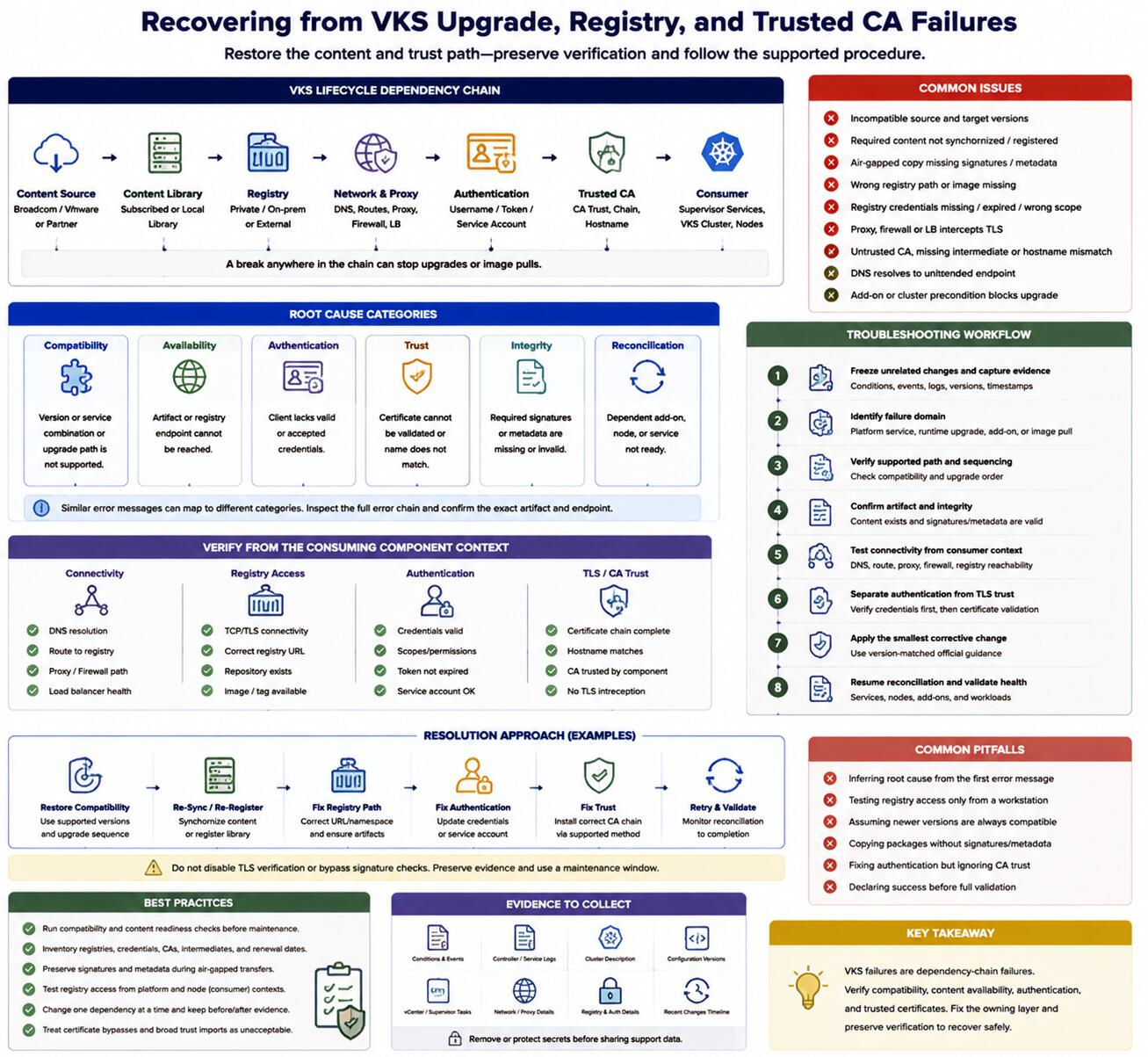
VMware vSphere Kubernetes Service (VKS) lifecycle operations depend on compatible versions, complete package content, registry reachability, authentication, and trusted certificate chains. When one dependency fails, Supervisor Services or VKS clusters can remain reconciling and application images may fail to pull. Recovery should preserve evidence and restore the content or trust path rather than bypassing verification.
Troubleshooting Methodology
Identify the failed operation and its reconciliation owner. Distinguish a Supervisor or VKS Service upgrade from a vSphere Kubernetes release (VKr) cluster upgrade or an application image pull. Record the source and target versions, content source, registry endpoint, certificate chain, proxy behavior, and last successful reconciliation.
Read status conditions and logs from the controller reporting failure. Then validate the dependency from the same network and trust context as that controller. A registry test from an administrator workstation does not prove that a Supervisor component or VKS node can resolve, reach, authenticate to, and trust the endpoint.
Common Issues
Issue Analysis
- The target VKS or VKr version is not compatible with the current platform or upgrade path.
- Required content has not synchronized or been registered for the environment.
- An air-gapped package copy is incomplete or lacks required signature metadata.
- The registry path is incorrect or an image is missing.
- Registry credentials are absent, expired, or scoped incorrectly.
- A proxy, firewall, or load balancer intercepts Transport Layer Security (TLS) and presents an unexpected certificate.
- The issuing certificate authority (CA), intermediate CA, or hostname is not trusted by the component making the connection.
- Domain Name System search behavior resolves a registry name to an unintended endpoint.
- A cluster precondition, such as add-on health, blocks upgrade reconciliation.
Root Cause Considerations
Classify the failure before changing anything:
- Compatibility: The source and target versions or services cannot operate in the requested sequence.
- Availability: The artifact or registry endpoint cannot be reached.
- Authentication: The client lacks accepted credentials.
- Trust: The endpoint certificate cannot be validated or does not match the requested name.
- Integrity: Required package signatures or metadata are missing.
- Reconciliation: A dependent add-on, node, or service is not ready.
These categories can produce similar error text. Inspect the complete error chain and confirm the exact artifact and endpoint involved.
Resolution Approach
Use the official procedure for the deployed release. Restore version compatibility or the documented upgrade sequence; synchronize or re-register approved content; correct registry paths and credentials; and distribute the correct CA chain through supported trust configuration.
If content was transferred to a private registry, repeat the documented copy process with required metadata and signatures rather than modifying verification controls. Never disable TLS verification or import an unverified certificate merely to continue an upgrade.
Upgrades and trust changes can affect the platform broadly. Preserve backups and support data, validate rollback or recovery options, and use a controlled maintenance window.
Troubleshooting Workflow
- Freeze unrelated changes and capture conditions, events, logs, versions, and timestamps.
- Identify whether the failure belongs to platform service, workload-cluster release, add-on, or application content.
- Verify the supported source-to-target path and required sequencing.
- Confirm that the expected artifact exists and retains required integrity metadata.
- Test Domain Name System, route, proxy, and registry reachability from the consuming component's context.
- Separate registry authentication from TLS certificate validation.
- Correct the smallest failed dependency using version-matched official guidance.
- Resume reconciliation and validate service, node, add-on, and workload health.
Best Practices
- Run compatibility and content-readiness checks before a maintenance window.
- Inventory registry endpoints, credentials, issuing CAs, intermediates, and renewal dates.
- Preserve signatures and metadata during air-gapped transfers.
- Test registry access from the platform and node contexts that consume content.
- Change one dependency at a time and retain before-and-after evidence.
- Treat certificate bypasses and broad trust imports as unacceptable permanent solutions.
Certification Relevance
The 3V0-24.25 scope includes lifecycle, registries, trusted CAs, content libraries, packages, and failed-upgrade recovery. Preparation should focus on categorizing failures and selecting the responsible layer, supported verification method, and safe recovery path.
Conclusion
VKS upgrade and registry failures are usually dependency-chain failures. Compatibility, content availability, authentication, certificate trust, integrity, and controller readiness must all align. Diagnose the category, repair the owning dependency, and let supported reconciliation complete without weakening security controls.