
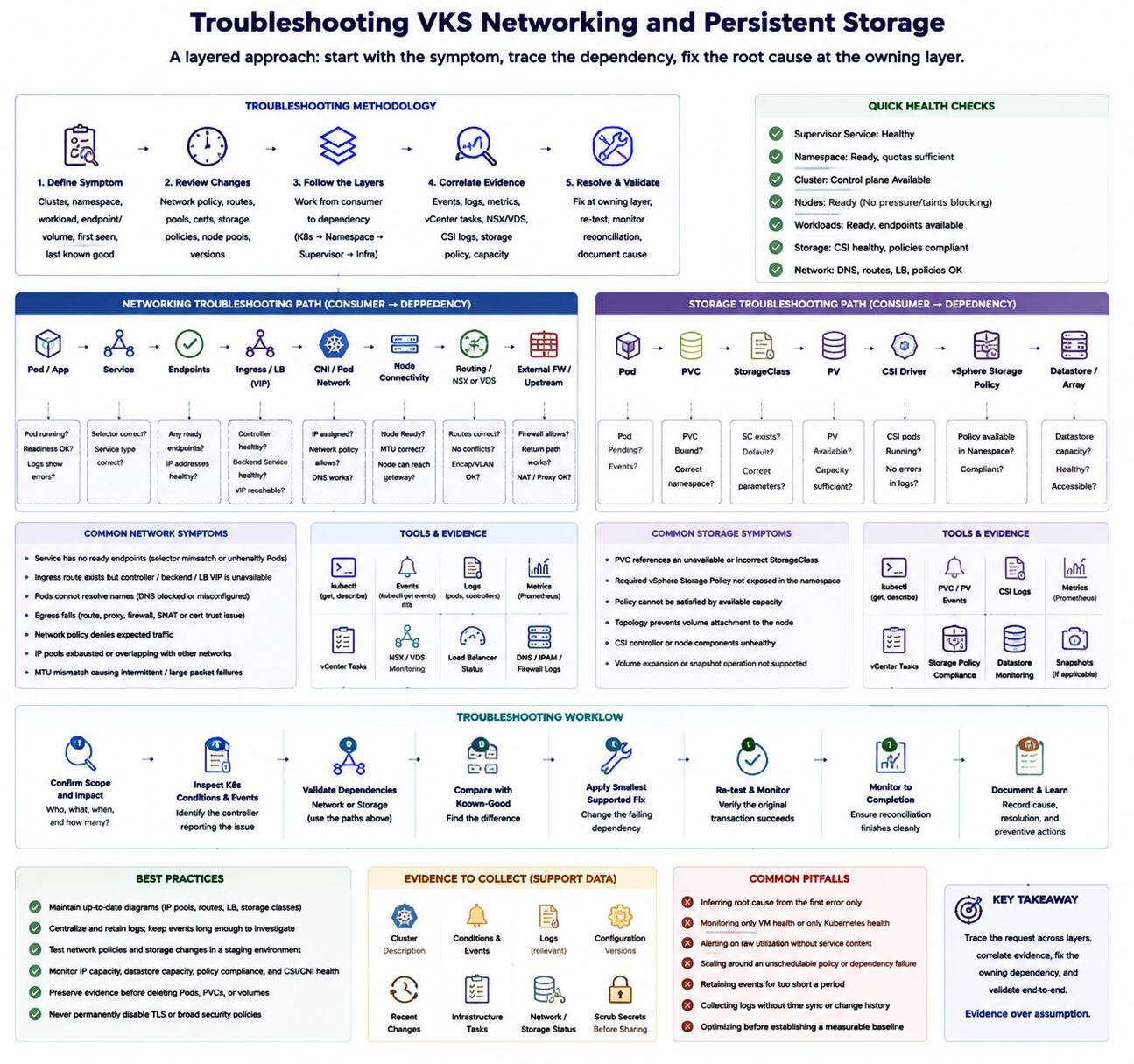
Introduction
Networking and storage failures in VMware vSphere Kubernetes Service (VKS) often surface as Kubernetes symptoms even when their cause is an infrastructure dependency. Pods may remain Pending, Services may be unreachable, or PersistentVolumeClaims may remain unbound. A disciplined investigation follows the affected request across Kubernetes, the vSphere Namespace, the vSphere Supervisor, and the underlying network or storage platform.
Troubleshooting Methodology
Start by defining the symptom precisely: affected cluster, namespace, workload, endpoint or volume, first failure time, and last known successful operation. Record recent changes to network policy, routes, address pools, certificates, storage policies, node pools, or platform versions.
Work from the consumer toward the dependency. For networking, trace name resolution, Service endpoints, ingress or load-balancer state, Pod policy, node connectivity, routing, and external firewalls. For storage, trace the Pod, PersistentVolumeClaim (PVC), StorageClass, PersistentVolume (PV), vSphere Container Storage Interface (CSI) Driver, vSphere Storage Policy, datastore, and attachment path.
Common Issues
Issue Analysis
Common network symptoms include:
- A Service has no ready endpoints because its selector does not match healthy Pods.
- An ingress route exists but the controller, backend Service, or load-balancer virtual address is unavailable.
- Pods cannot resolve names because Domain Name System traffic is blocked or misconfigured.
- Egress fails because a route, proxy, firewall, source translation, or certificate trust path is missing.
- Network policy denies a flow that was not included in the application model.
- Address pools are exhausted or overlap with other routed networks.
- Maximum Transmission Unit mismatch causes selective or large-packet failure.
Common storage symptoms include:
- A PVC references an unavailable or incorrectly named StorageClass.
- The vSphere Namespace does not expose the required vSphere Storage Policy.
- The selected policy cannot be satisfied by accessible capacity.
- Topology rules place a Pod where its volume cannot be attached.
- CSI controllers or node components are unhealthy.
- A volume expansion or snapshot request is unsupported by the installed combination.
Root Cause Considerations
Do not infer root cause from the first error alone. A timeout can represent routing, policy, name resolution, load-balancer health, or an unready backend. An unbound PVC can represent policy mapping, capacity, topology, driver health, or an invalid request.
Use Kubernetes conditions and events to identify the controller reporting the failure. Correlate them with vCenter Server tasks, NSX or VDS evidence, load-balancer status, CSI logs, storage-policy compliance, and datastore health. Verify version-specific behavior in official documentation before applying a workaround.
Resolution Approach
Correct the failed dependency at its owning layer. Restore ready Service endpoints before changing load-balancer configuration. Repair routing or policy instead of disabling security controls. Make an eligible storage policy available rather than editing a bound PV manually.
Changes to address pools, network topology, storage policy, or live volumes can cause outages or data loss. Back up configuration, follow supported procedures, and use an approved maintenance window where required.
Troubleshooting Workflow
- Confirm scope, timing, impact, and recent changes.
- Inspect workload and node readiness, conditions, and events.
- For networking, validate Domain Name System, endpoints, CNI state, network policy, ingress, load balancer, routing, and firewall paths in that order.
- For storage, validate PVC, StorageClass, PV, CSI health, namespace policy, vSphere task, datastore capacity, and topology.
- Compare a failing object with a known-good object in the same layer.
- Apply the smallest supported correction.
- Re-test the original transaction and monitor reconciliation to completion.
- Capture the cause, affected dependency, and preventive control.
Best Practices
- Maintain current diagrams for address pools, routes, load-balancer placement, storage classes, and policy mappings.
- Centralize logs and preserve Kubernetes events beyond their short operational window.
- Test network policy and storage changes in a representative environment.
- Monitor IP capacity, datastore capacity, policy compliance, and CSI or CNI component health.
- Avoid deleting Pods, claims, or volumes before preserving diagnostic evidence.
- Never disable TLS validation or broad security policy as a permanent fix.
Certification Relevance
The 3V0-24.25 scope expects practitioners to connect Kubernetes symptoms to NSX, VDS, load balancing, CNI, vSphere Storage Policies, CSI, and vSphere Namespace dependencies. Effective preparation uses layered labs and official troubleshooting references rather than memorized error messages.
Conclusion
VKS network and storage incidents become manageable when each request is traced through its responsible layers. Start with the affected Kubernetes object, follow controller evidence to the platform dependency, and correct the smallest verified cause. This method protects data and avoids broad changes that hide rather than solve the fault.