
Introduction
VMware vSphere Kubernetes Service (VKS) lifecycle management coordinates Kubernetes versions, cluster nodes, platform services, and dependent packages. A vSphere Kubernetes release (VKr) supplies a supported Kubernetes software baseline for VKS clusters. Lifecycle work should be planned as a compatibility and recovery process, not treated as a routine image replacement.
What Is the VKS Lifecycle
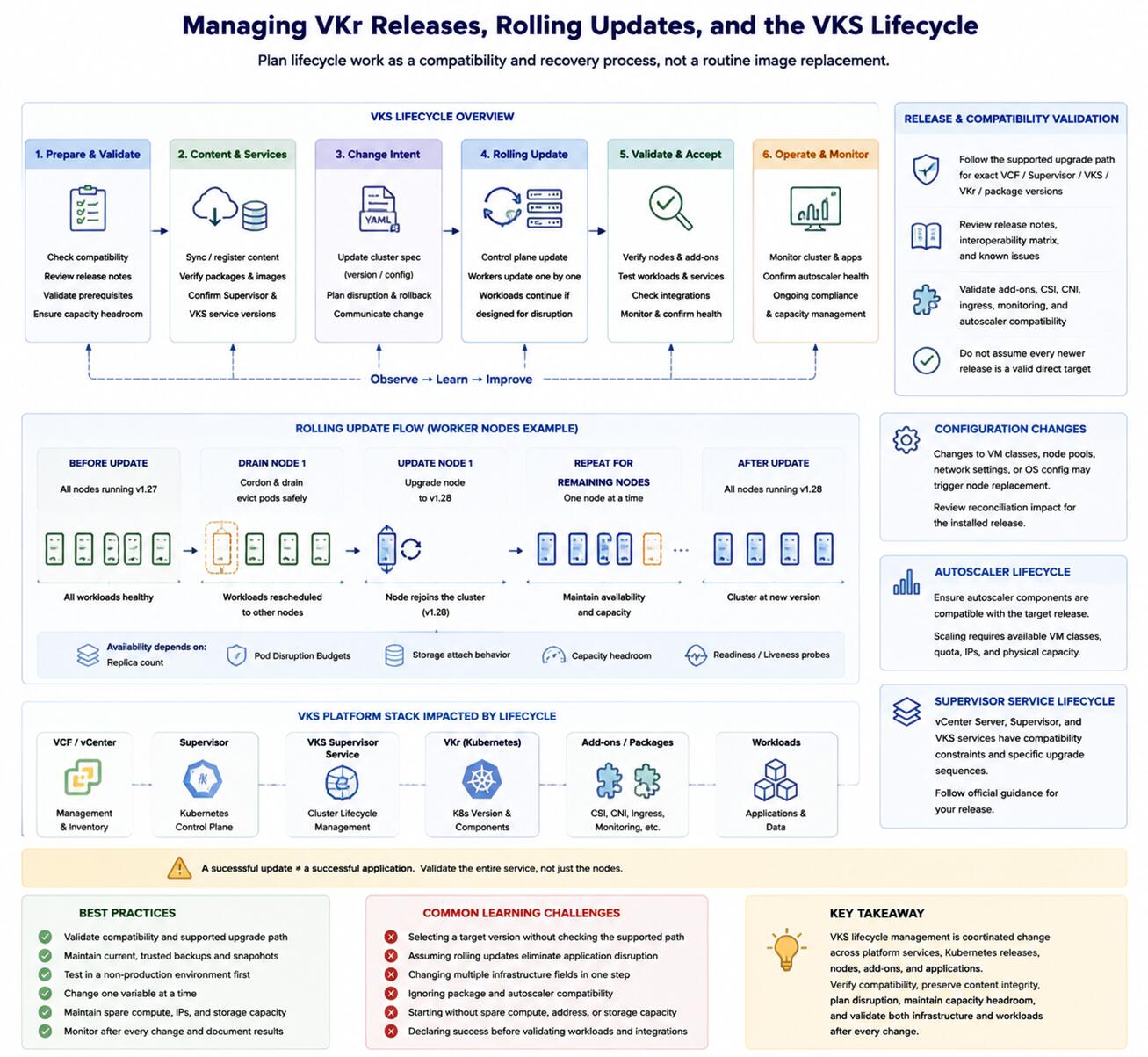
The lifecycle includes registering or synchronizing supported content, validating compatibility, changing a cluster's desired version or configuration, reconciling control-plane and worker nodes, and confirming workloads afterward. Supervisor and VKS Supervisor Service lifecycle also affect which cluster releases and behaviors are available.
Tanzu Kubernetes release (TKr) is legacy terminology. Use VKr for current VKS documentation unless discussing a source or environment that retains the former name.
Why Lifecycle Planning Matters
Kubernetes versions have compatibility relationships with VKS services, Supervisor releases, add-ons, and application APIs. A successful node rollout does not prove that ingress, storage, monitoring, autoscaling, or business workloads remain healthy. Lifecycle acceptance must cover the entire service.
Core Concepts
Release and Compatibility Validation
Confirm the supported upgrade path and interoperability for the exact VCF, Supervisor, VKS, VKr, and package versions. Review release notes and known issues. Do not infer that every newer release is a valid direct target.
Rolling Updates
A rolling update replaces or updates nodes in a controlled sequence so workloads can continue when they are designed for disruption. Availability depends on replica count, Pod disruption budgets, storage attachment behavior, capacity headroom, and application readiness probes.
Configuration Changes
Changes to VM classes, node pools, network settings, or operating-system configuration may trigger node replacement depending on the installed release and field. Review the documented reconciliation impact before applying a manifest change.
Autoscaler Lifecycle
Cluster autoscaling components must remain compatible with the target cluster release. Validate their health and settings before and after an upgrade. Scaling cannot compensate for unavailable VM classes, quota, IP addresses, or physical capacity.
Supervisor Service Lifecycle
VKS and other Supervisor Services have their own versions and compatibility constraints. Platform upgrades may require a specific sequence among vCenter Server, Supervisor, and VKS services. Follow release-specific official guidance.
Target Audience
This article is for platform owners, change managers, and Kubernetes administrators responsible for supported upgrades and configuration changes.
Career or Technical Value
Lifecycle literacy helps practitioners predict reconciliation effects, design maintenance windows, and gather evidence before a change creates a broad incident.
Common Learning Challenges
- Selecting a target version without checking the supported path
- Assuming rolling updates eliminate application disruption
- Changing multiple infrastructure fields in one unobservable step
- Ignoring package and autoscaler compatibility
- Starting without spare compute, address, or storage capacity
- Declaring success before validating workloads and external integrations
Conclusion
VKS lifecycle management is coordinated change across platform services, Kubernetes releases, nodes, add-ons, and applications. Verify compatibility, preserve content integrity, plan disruption, maintain capacity headroom, and validate both infrastructure and workloads after every change.