
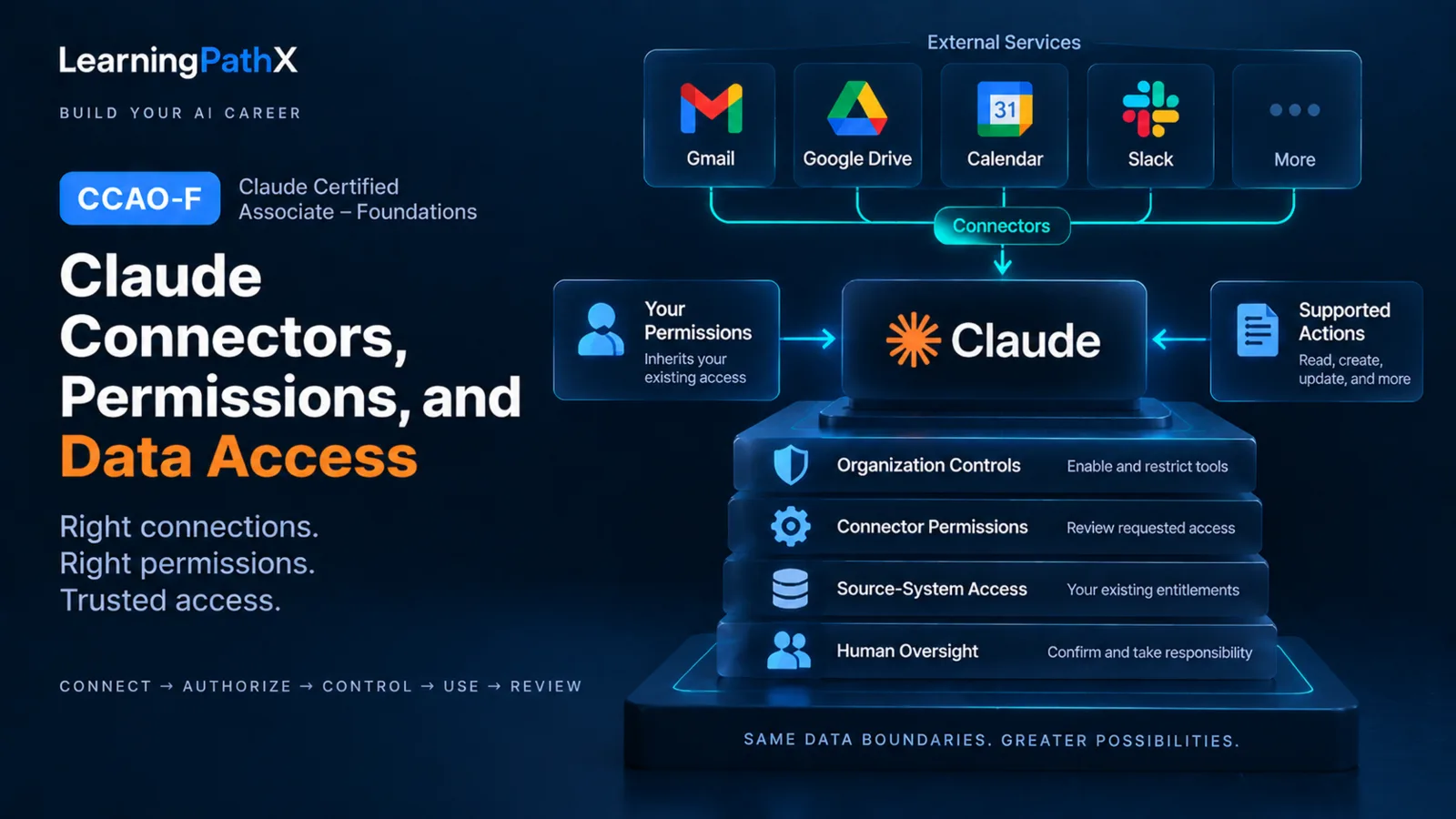
A team should select, authorize, and operate a Claude connector by passing eight gates: confirm the external source is necessary, map the user's inherited access, inspect the permissions requested during connection, inventory the connector's currently supported actions, obtain required organization approvals, classify the data's sensitivity, preserve confirmation for consequential actions, and review the connection periodically. If any gate lacks an accountable owner or an acceptable control, do not connect the service for that workflow.
The effective capability is the intersection of several boundaries, not a new entitlement. Anthropic documents that connectors can retrieve data or take supported actions while inheriting each person's permissions from the connected service. Source-system access sets the ceiling; the connector's implemented tools, Claude organization controls, and action-approval settings can narrow it further. None of those layers makes an inappropriate data use acceptable or removes the team's responsibility for the result.
Connector Access Architecture
A connector sits between Claude and an external service, but it does not replace either service's controls. Treat the operating path as five cumulative layers:
- Source-system identity and access: The connected account can reach only the records, files, mailboxes, calendars, channels, or other objects permitted in the source service.
- Connection authorization: The authentication flow requests access for a defined set of operations. Review the actual request instead of inferring it from the connector name.
- Supported connector tools: A connector exposes a particular set of read, write, update, send, or delete operations. Those operations differ by connector and can change.
- Claude organization and tool controls: For applicable work plans, organization owners enable connectors and can restrict action categories or individual tools. A control can reduce capability; it does not grant source access the user lacks.
- Human purpose and confirmation: The user still decides whether the request is appropriate, whether the evidence is sufficient, and whether a consequential action should proceed.
This layered view prevents two common errors: assuming that organization enablement grants data access, and assuming that successful authentication authorizes every possible use of the retrieved data.
Eight-Gate Connector Decision Framework
Use the following matrix before initial connection and whenever the connector, workflow, or access model changes.
| Gate | Decision question | Evidence to record | Stop condition |
|---|---|---|---|
| Source need | Does the workflow require current external data or an action in its system of record? | Named workflow step, source owner, and why a static approved input is insufficient | The source is merely convenient or unrelated to the task |
| Inherited access | Which connected identity and existing source permissions bound access? | Account, role, shared resources, and owner who can confirm the boundary | Access is broader than the person's work responsibility or cannot be explained |
| Requested permissions | What access does the authentication flow request? | Current permission screen or approved access record | A requested permission is unnecessary, unclear, or unapproved |
| Supported actions | Which read, create, update, send, share, or delete tools are currently exposed? | Current connector documentation and enabled-tool inventory | Consequential actions cannot be restricted or reviewed adequately |
| Organization approval | Who must enable or approve the connector and its tools? | Accountable owner, decision, scope, and review date | Required organization or data-owner approval is missing |
| Data sensitivity | Is the source data suitable for this use under policy, agreement, and handling rules? | Classification, allowed purpose, retention considerations, and escalation owner | The data, purpose, or handling path is prohibited or unresolved |
| Human confirmation | Which actions must pause for a person to verify target, content, and effect? | Approval rule by action category and named approver | A high-impact or destructive action can run without an acceptable checkpoint |
| Periodic review | When will access, use, and tool settings be rechecked? | Owner, interval, event triggers, findings, and removal decision | No owner or review trigger exists |
Passing the matrix is not permanent approval. It is a recorded decision for a specific connector, connected identity, workflow, and point in time.
Gate 1: Confirm the Source Need
Use a connector when the task needs live information from an external service or must perform an approved action there. Start with the narrow business outcome: for example, summarizing current messages for an incident handoff or creating a reviewed calendar event. Do not begin with “connect everything” and search for uses later.
If the workflow can use a bounded, approved input without maintaining a live connection, that alternative may reduce the access surface. Choosing and curating general Project knowledge is a separate configuration responsibility; this gate only determines whether external-service access is necessary.
Gate 2: Map Inherited Access
Identify the exact account that will authenticate and the source objects it can already access. Include access received through shared drives, shared calendars, groups, channels, delegated mailboxes, or other service-specific mechanisms when applicable. A connector cannot be treated as a least-privilege control if the connected source account is already overprivileged.
Do not try to redesign source-system roles inside the connector workflow. Escalate unclear or excessive access to the source owner or administrator, and resume only after that owner confirms the intended boundary.
Gate 3: Inspect Requested Permissions
Read the authentication prompt and record the permissions it requests. A broad permission description is a reason to investigate, not proof that Claude will execute every operation automatically. Conversely, a read-oriented use case does not make a connector read-only when the installed connector also exposes write or delete tools.
Recheck the prompt after reconnecting or after a connector update. If the request changes, treat the change as a new authorization decision rather than silently accepting it.
Gate 4: Inventory Supported Actions
Separate retrieval from changes to the source service. Build an inventory using verbs such as search, read, create, update, send, share, move, and delete. Verify it against current connector-specific documentation because the general connector category does not establish what one integration can do.
For Team and Enterprise plans, Anthropic currently documents organization-level tool restrictions that can be set to Always allow, Needs approval, or Blocked. Those controls operate alongside source permissions: allowing a tool does not add source access, while blocking it narrows what the connector may do.
Gate 5: Obtain Organization Approval
Connector availability and authorization are separate decisions. Anthropic documents that an Owner or Primary Owner must enable connectors for Team and Enterprise organizations before members can use them; organization enablement normally does not itself give an individual source access. Each user generally authenticates the connected service, subject to current plan and authentication options.
Record who approved the connector, which users or workgroups may use it, which tools are allowed, and which uses are excluded. For Claude for Work accounts, the organization determines available Claude services and features and may impose its own internal policies. Connector approval therefore belongs inside the organization's data and workflow governance, not outside it.
Gate 6: Classify Data Sensitivity and Purpose
Check both the data and the intended use. A user may be technically able to read a record while lacking an appropriate business purpose to bring it into a Claude conversation. Record the source classification, approved purpose, recipients, retention or deletion expectations, and the owner who resolves exceptions.
The workflow must comply with the organization's agreements and policies as well as the current Anthropic Usage Policy. When applicability is unclear, stop and obtain guidance from the responsible privacy, security, compliance, legal, or data owner rather than treating connector availability as approval.
Gate 7: Preserve Human Confirmation
Confirmation should be proportional to consequence. Keep a person in the loop for actions that communicate externally, change access, alter records, move or delete files, create commitments, or otherwise have a material effect. The reviewer should see the intended target, action, content, and relevant source evidence before approval.
Do not assume every connector uses the same confirmation behavior. Inspect the current connector tools and organization settings, then assign Needs approval or Blocked where the available control supports it. Even when a low-risk action is allowed without a prompt, the user remains accountable for asking for an appropriate operation and checking the result.
Gate 8: Review and Remove Access
Assign a connector owner and a review interval. At each review:
- Reconfirm that the workflow still needs the connector.
- Recheck the connected identity and inherited source access.
- Compare requested permissions and supported tools with the approved record.
- Inspect organization restrictions and confirmation settings.
- Review representative use for purpose, sensitivity, and unexpected effects.
- Disconnect unused connectors and record the decision.
Trigger an earlier review after a role change, offboarding event, source-permission change, connector update, new write or delete capability, data-classification change, policy change, or material workflow redesign. Anthropic's connector guidance also advises reviewing access during connection and disconnecting services that are no longer needed.
Google Workspace Is a Connector-Specific Example
Google Workspace illustrates why teams must verify each connector rather than reuse an old capability assumption. As verified on 2026-08-24, Anthropic's Google Workspace connector guidance documents distinct capabilities for Gmail, Google Calendar, and Google Drive:
| Connector | Current documented examples | Important qualification |
|---|---|---|
| Gmail | Search and read messages; create drafts; send, reply to, and forward messages; manage labels and threads | Sending, replying, and forwarding require approval by default; Team and Enterprise owners control whether members may allow those actions without asking each time. Gmail attachment metadata is available, but attachment content is not directly accessible through Gmail. |
| Google Calendar | View accessible calendars and events; create, update, and delete events; manage attendees and invitations | These are Calendar-specific tools and remain bounded by the connected Google account and current Claude approval settings. |
| Google Drive | Search and read supported files; inspect metadata; upload files; create folders; share, move, and trash files | Sharing, moving, and trashing require approval by default; Team and Enterprise owners control whether members may allow those actions without asking each time. Embedded images in documents are not processed by the documented text extraction. |
These facts replace the legacy assumption that the Gmail connector could draft but not send email. They do not establish that another connector can send messages, change calendars, or modify files. Before use, inspect that connector's current permission request, documented tools, availability, and approval behavior.
Operating Patterns and Common Mistakes
An effective operating record is concise: connector and owner, connected identity, approved workflow, inherited-access owner, requested permissions, enabled tools, blocked or approval-required actions, data classification, review date, and removal trigger. Link the record to the organization's existing access-review or change-control process rather than creating an unowned connector inventory.
Avoid these mistakes:
- Enabling a connector before naming the source need and accountable owner
- Treating organization enablement as a grant of source-system access
- Reviewing the connector name but not the authentication permissions and actual tools
- Assuming “can read” means “cannot write”
- Generalizing Gmail, Calendar, or Drive behavior to another connector
- Treating inherited access as proof that every use of the data is appropriate
- Removing confirmation for consequential actions without a documented risk decision
- Leaving a connector connected after the workflow, role, or source need ends
- Expecting Claude or the connector to administer source-system roles and sharing correctly on the team's behalf
Certification Relevance
For Claude Certified Associate – Foundations (CCAO-F), this framework covers the connector portion of D5.2, maintenance decisions in D5.4, and the supporting D6.2 boundary for data sensitivity, privacy, and permissions. A useful original practice exercise is to evaluate one documented connector: define a legitimate source need, map the test identity's existing access, list requested permissions and supported tools, choose organization and confirmation controls, classify the test data, and specify the review and removal trigger. Use synthetic or approved data rather than confidential production material.
Keep the neighboring objectives distinct. CCAO-F: Configuring Claude Projects, Instructions, and Knowledge owns Project instructions and knowledge curation; CCAO-F: Troubleshooting Underperforming Claude Prompts and Outputs diagnoses a weak result after configuration; CCAO-F: Governance, Risk, Privacy, and Responsible Claude Use owns the broader appropriateness and governance decision; and CCAO-F: Choosing Claude Products and Capabilities for Work compares whether a connector or another Claude capability fits the task. This article owns the access-and-operation decision for an existing connector, not custom connector development, Model Context Protocol engineering, or source-system administration.
Conclusion
A connector is appropriate only when a specific source need survives all eight gates. Bind the connection to the user's existing access, inspect current permissions and tools, narrow actions through organization and confirmation controls, verify that the data and purpose are allowed, and remove access when the need ends. Repeating that decision after material changes lets a team use current external data and supported actions without mistaking technical connectivity for unrestricted authority.
Authoritative Sources
- Use connectors to extend Claude's capabilities
- Use Google Workspace connectors
- Who owns and manages the data of my team?
- Anthropic Usage Policy