
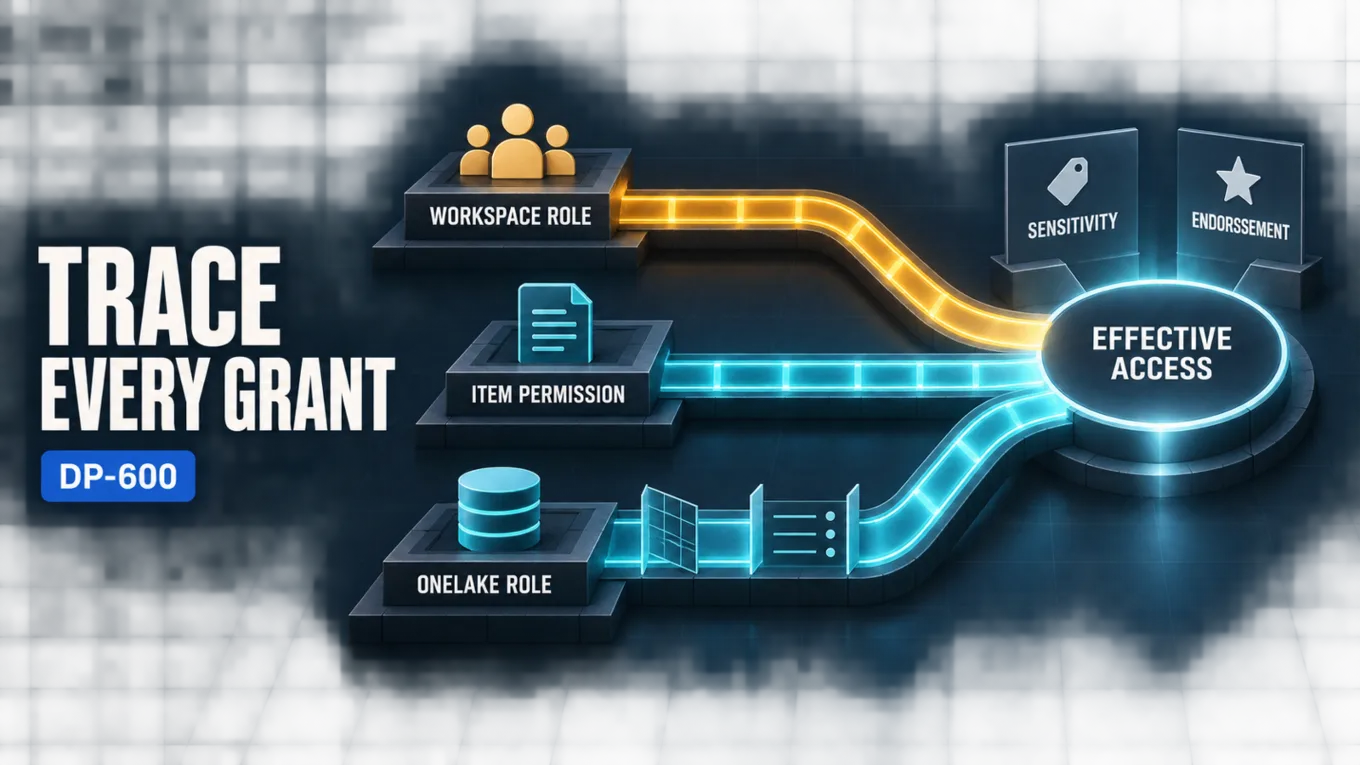
Securing a Microsoft Fabric analytics solution requires several coordinated layers: use workspace roles for broad collaboration duties, item permissions for access to a specific asset, and OneLake security roles for the tables, folders, columns, and rows that a consumer may read. Add sensitivity labels to classify content and, where supported protection policies are configured, restrict access to labeled items. Use endorsement to signal whether content is trusted for reuse. Labels and endorsements complement the permission design; neither eliminates the need to trace every access path.
The central design constraint is that Fabric permissions are not one universal filter. OneLake security uses a grant model, so a restrictive data role cannot cancel access that a user receives through another role or permission model. Effective access therefore depends on every path by which the identity receives a grant. A least-privilege review must evaluate workspace membership, direct item sharing, and OneLake data roles together rather than inspecting any one layer in isolation.
Architecture Overview for Fabric Security and Governance
Fabric separates management permissions from data permissions. The control plane determines who can create, share, configure, or administer analytical items. The data plane determines which OneLake data an identity can read. Workspace and item permissions operate primarily at the control-plane layers, although some grants also confer data access. OneLake security provides the granular data-plane layer.
This produces a hierarchy with different responsibilities:
- Workspace roles establish broad capabilities across every item in a workspace.
- Item permissions give an identity access to one item and its applicable endpoints without making that identity a workspace member.
- OneLake security roles grant access to selected data and can constrain the accessible objects, columns, or rows.
- Sensitivity labels classify items under the organization's information-protection scheme.
- Endorsement communicates an item's readiness and trust level for discovery and reuse.
The Microsoft Fabric data security overview documents the control-plane and data-plane distinction and should be the starting point when mapping these layers.
Core Access-Control Components
Workspace Roles Define the Broad Trust Boundary
A workspace is the collaboration boundary for a collection of Fabric items. Its Admin, Member, Contributor, and Viewer roles are intentionally broad. Admin, Member, and Contributor roles can read and write OneLake data in the workspace according to their documented capabilities, while a Viewer does not receive OneLake data access by default and can be granted access through OneLake security roles.
Use workspace membership for people who genuinely require workspace-wide duties. For example, an engineer who builds and maintains several items may need Contributor capabilities. A regional analyst who needs only governed access to one lakehouse normally should not receive that same workspace-wide role merely for convenience.
Group-based assignments make this boundary easier to operate and audit. The role should still reflect the group's job function: group management reduces assignment effort, but it does not make an overprivileged role appropriate.
Item Permissions Narrow the Collaboration Scope
Item sharing provides direct access to a specific Fabric item. It is useful when a person must discover or use one asset but should not become a member of the containing workspace. Item permissions can include distinct capabilities such as viewing item metadata, connecting to an endpoint, or reading OneLake data; the available permissions depend on the item type.
Do not interpret an item-level Read grant as a universal data-read grant. In the documented model, Read exposes item metadata, while other permissions govern applicable SQL or OneLake data access. Verify the effective permission set on the item's Manage permissions page and test the same access path the consumer will use.
OneLake Security Governs Data Inside the Item
OneLake security roles specify the data, permission, members, and optional constraints for a grant. They are designed for consumers who have the Viewer workspace role or direct Read permission on an item. Workspace Admins, Members, and Contributors are not restricted by these roles and can access the item's data through their broader workspace grants.
That distinction is crucial: fine-grained OneLake rules are not a compensating control for excessive workspace membership. If a user should be constrained to a subset of the data, first remove broader access paths, then grant the required subset through OneLake security.
Layering Object, File, Column, and Row Access
Choose the narrowest control that matches the data boundary, but consider how the controls interact inside a role.
Object-Level and File Access
Object-level security (OLS) grants access to selected tables or folders. This provides both structured and unstructured data boundaries because Delta Parquet tables, schemas, and file collections are represented through folders in OneLake. A role can therefore expose a curated table set, a particular schema, or a specific folder beneath an item's Files area while leaving other objects outside the grant.
File-level access in an architecture discussion is best treated as folder-scoped OneLake access, not as an assumption that every individual file inherits an independent application permission. Organize files into folders that correspond to access boundaries. Mixing public and restricted files in the same granted folder makes the authorization model harder to express and easier to misconfigure.
Column-Level Security
Column-level security (CLS) grants access only to selected columns. Use it when consumers may query a table but must not see fields such as personal identifiers or confidential financial attributes. Engine behavior can differ when a query requests a denied column: for example, a broad SELECT * may return only allowed columns in one experience but fail in another. Design consumer queries and validation tests around the supported engine rather than assuming an identical user experience everywhere.
Row-Level Security
Row-level security (RLS) filters tabular data for members of a role. It fits boundaries such as region, business unit, or customer assignment. RLS applies to rows in tables, not unstructured file folders. A role rule must reference the correct table schema; if a referenced column no longer exists, evaluation can fail rather than silently exposing unrestricted data.
Combining Controls Safely
OneLake supports RLS and CLS together when both policies are defined in a single OneLake security role. Splitting the row rule and column rule across separate roles for the same user is not a supported composition and can produce query errors. Keep related constraints together and test representative identities against every required engine.
The OneLake table, column, and row-level security documentation explains these granular controls and their role-combination behavior.
How the Layers Work Together
Consider a sales lakehouse shared by a central engineering team and regional analysts:
- Engineers who build and maintain the lakehouse receive an appropriate workspace role through an engineering security group.
- Regional analysts receive direct Read permission on the lakehouse rather than a workspace authoring role.
- A OneLake security role grants each analyst group access to curated sales tables, filters rows to its region, and excludes restricted columns in the same role.
- A separate folder grant exposes approved reference files while leaving raw landing folders outside the role.
- A sensitivity label reflects the organization's classification for the item; an associated protection policy can also restrict access to supported items.
- An endorsement indicates whether the governed asset is promoted or has passed the organization's certification process for reuse.
The design succeeds only if the analyst identities have no broader grant. An analyst who is also a workspace Contributor can read the item's data through that workspace role, regardless of the narrower OneLake role. Similarly, a second OneLake role can add access; the first role cannot use a denial to subtract it.
This is the grant-model caveat in operational terms: calculate effective access as the union of valid grants, then apply the constraints supported within the selected role. Removing an identity from a narrow role does not remove access supplied elsewhere.
Governance with Sensitivity Labels and Endorsement
Sensitivity and trust are separate governance questions. A sensitivity label answers, “How should this content be classified and protected under organizational policy?” Endorsement answers, “How confidently should consumers reuse this item?” The label can participate in access control when an appropriately configured Fabric protection policy is associated with it, while endorsement does not grant access.
Apply labels according to the organization's Microsoft Purview information-protection policy and verify what the policy enforces for the item and downstream artifacts. Fabric supports label inheritance and supported export-protection paths, while protection policies can restrict access to supported native Fabric items and Power BI semantic models. Those policies have licensing, tenant-setting, item-support, and integration limitations, so do not infer enforcement from a visible label alone. Keep workspace, item, and OneLake controls explicit and test the combined effective access.
Use endorsement as a discovery and trust signal. A Promoted badge means that an item creator considers the item ready for sharing and reuse. A Certified badge means that an organization-authorized reviewer has determined that the item meets the organization's quality standards; certification must be enabled and governed by the organization. These badges improve visibility and help consumers find trusted content, but they do not grant access or prove that the underlying data permissions are correct.
Together, labels and endorsements help users interpret an asset after security establishes whether they can reach it. This separation prevents a “certified” item from being mistaken for a public item and prevents a highly classified item from being treated as well governed when its grants remain overly broad.
Design Considerations and Best Practices
Start with Identities and Access Paths
Create an access matrix that maps each user group to its required workspace actions, items, data objects, and query engines. For each identity, enumerate all possible grants:
- workspace role membership, including nested group membership;
- direct item permissions and sharing links;
- OneLake security role membership;
- access inherited through the DefaultReader role when ReadAll is present;
- access through the endpoint or engine used by the workload.
Grant broad workspace roles only to builders and operators whose duties require them. Use item and OneLake roles for governed consumption. Review group membership as part of the same control, because an accurate role definition cannot compensate for an inaccurate membership list.
Align Storage Layout with Security Boundaries
Place tables and files with different audiences in separate schemas or folders when practical. Clear structural boundaries make OLS and folder grants easier to reason about. They also reduce the temptation to rely on fragile naming conventions or broad folder access followed by expectations that downstream tools will hide sensitive content.
Validate Effective Access, Not Configuration Screens Alone
Test with representative non-administrator identities. Verify metadata visibility, item opening, table enumeration, file access, row filters, allowed columns, and denied paths through each required engine. Include negative tests that confirm a user cannot reach data outside the intended boundary.
Repeat these checks after role, group, schema, or folder changes. Security configuration is only persuasive when the observed effective access matches the design.
Common Mistakes
- Using Contributor for read-only consumers: The workspace role supplies broader data access than a constrained consumer needs.
- Treating a OneLake role as a deny rule: A role grants access and cannot cancel a grant from another role or permission model.
- Equating item Read with data access: Metadata visibility, endpoint access, and OneLake data access use distinct permissions.
- Splitting RLS and CLS across roles: Their supported combined design places both constraints in the same OneLake security role.
- Applying RLS to unstructured files: Rows apply to tables; folders and files require object- or folder-level design.
- Assuming a label is the complete authorization model: Verify the associated protection policy and its limitations, then test it alongside workspace, item, and data permissions.
- Assuming endorsement grants access: Endorsement signals trust and discoverability, not authorization.
- Testing only as an administrator: Broad administrative access can conceal errors that affect actual consumers.
Certification Relevance
The current DP-600 study guide includes workspace-level and item-level access controls; row-level, column-level, object-level, and file-level access; sensitivity labels; and endorsements within the “Implement security and governance” objective. The official DP-600 study guide establishes that scope as of July 21, 2026.
Preparation should focus on explaining why each layer exists and tracing effective access through a realistic identity. The useful skill is not memorizing control names in isolation; it is recognizing when a broad grant bypasses a narrower intended design and selecting the right layer for collaboration, data restriction, classification, or trust.
Conclusion
A defensible Fabric security architecture starts with the broadest grant and works inward. Keep workspace roles limited, use item permissions for targeted asset access, and use OneLake security for table, folder, column, and row grants. Then add sensitivity labels for classification and endorsement for trust signaling.
The final verification question should always be: “What access does this identity receive from every applicable path?” That question exposes the grant-model problems that a review of any single role or permission page can miss.
Authoritative Sources
- Study guide for Exam DP-600
- Data security overview
- Table, column, and row-level security in OneLake
- Governance overview and guidance
- Protection policies in Microsoft Fabric
- Endorsement overview