
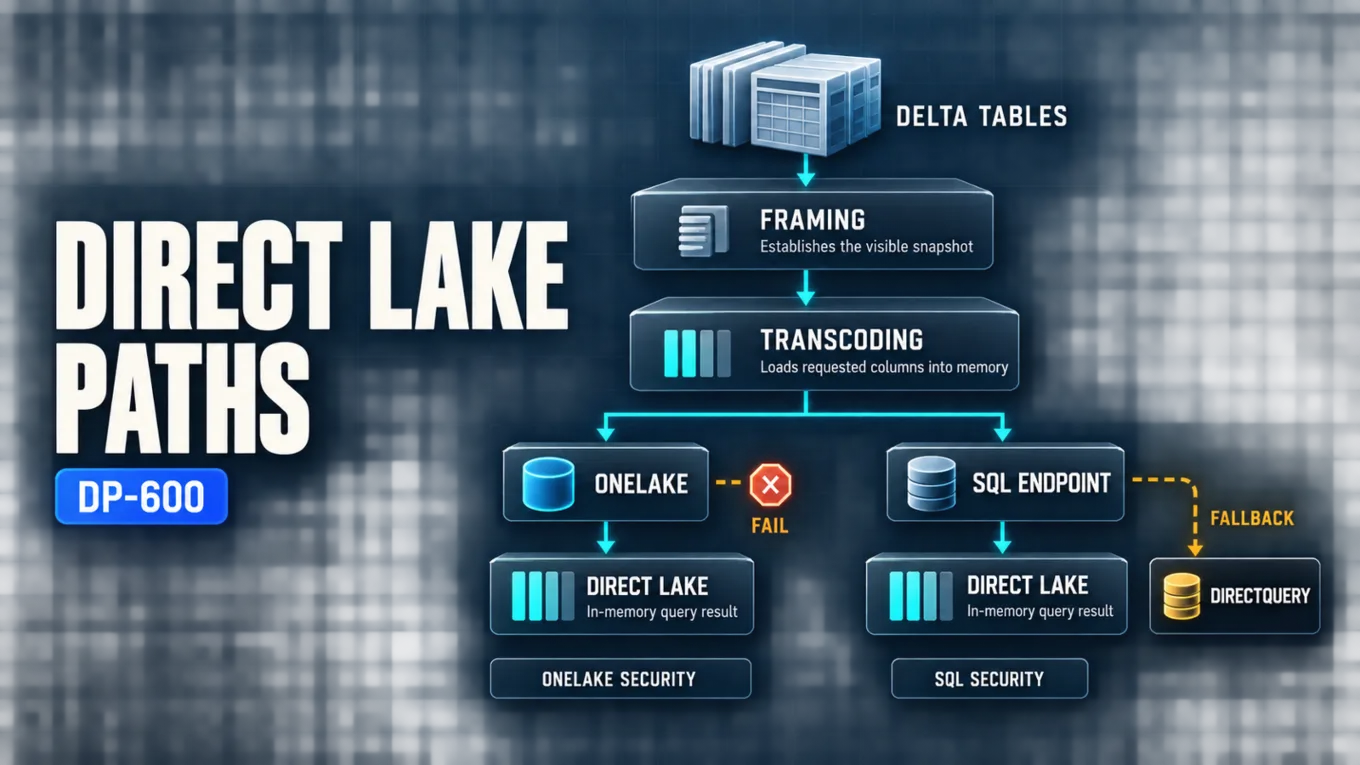
Direct Lake on OneLake is the preferred new-model architecture when a semantic model should read Delta tables through OneLake, use OneLake security, and never switch silently to DirectQuery. Direct Lake on SQL endpoints is the compatibility-oriented choice when the model needs discovery or access through one lakehouse or Warehouse SQL analytics endpoint, including SQL views or SQL-based security, but those dependencies can trigger DirectQuery fallback or query errors.
Both options transcode requested columns into memory and use framing to establish the Delta-table snapshot visible to queries. Their key difference is the failure path: Direct Lake on OneLake either serves the framed data in Direct Lake mode or fails when the model cannot do so, while Direct Lake on SQL endpoints can query the SQL analytics endpoint when fallback is allowed. That continuity can preserve results, but it changes freshness, performance, source load, and security evaluation.
Direct Lake Architecture Overview
Direct Lake is a Power BI semantic-model table storage mode for Delta tables in OneLake. Unlike Import mode, it does not copy the entire selected dataset into the semantic model during refresh. Unlike DirectQuery, a normal Direct Lake query does not translate every Data Analysis Expressions (DAX) request into a source query. Instead, the VertiPaq engine loads required columns from the Delta table's Parquet files and answers queries from memory.
The two Direct Lake options share that in-memory path but connect to source metadata differently. Microsoft's current Direct Lake overview distinguishes them as follows:
| Architecture concern | Direct Lake on OneLake | Direct Lake on SQL endpoints |
|---|---|---|
| Source scope | Delta tables from one or more Fabric data sources | Delta tables or SQL views from one lakehouse or Warehouse SQL analytics endpoint |
| SQL endpoint dependency | Not coupled to the SQL analytics endpoint | Uses the endpoint for discovery and permission checks |
| DirectQuery fallback | Not supported; operates as DirectLakeOnly | Controlled by DirectLakeBehavior |
| SQL views | Non-materialized SQL views aren't supported as Direct Lake tables | Views are available, but their queries fall back to DirectQuery |
| SQL endpoint granular security | Does not apply SQL endpoint security; use OneLake or semantic-model controls | SQL row-level security can cause fallback; denied tables or columns can cause query errors |
| Guardrail breach | Refresh can fail and the model can become unavailable for queries until the Delta tables comply | Can fall back when enabled; refresh can succeed with a warning and queries can continue more slowly |
| OneLake security | Integrated path for unified OneLake controls | Not the data-access-rule option for this architecture |
Choose the path before building security rules or operational expectations. A model that appears to be Direct Lake in metadata can behave like DirectQuery for particular queries when it uses the SQL-endpoint option and fallback conditions occur.
Transcoding Loads Columns on Demand
Transcoding is the on-demand loading of complete columns from OneLake into semantic-model memory. When a query arrives, the model determines the columns required directly by the query and indirectly by measures and relationships. It loads any required nonresident columns from the underlying Parquet files; later queries can reuse resident columns.
Resident columns are a cache, not a permanent copy. They can be evicted after source changes are framed, after inactivity, or because capacity memory is under pressure. High-cardinality columns take more resources to load and hold, and excessive eviction can make users repeatedly pay the column-loading cost. Direct Lake can therefore analyze more data than is resident at one time, but it does not remove the need to manage model width, cardinality, concurrency, and memory headroom.
The same transcoding principle applies to both Direct Lake options. DirectQuery fallback is a different path: the query is sent to the SQL analytics endpoint instead of being satisfied by the Direct Lake in-memory cache.
Framing Defines the Visible Delta Snapshot
Framing is the Direct Lake operation performed by a semantic-model refresh. It reads Delta metadata and updates the model's references to the Parquet files that form the new point-in-time baseline. It does not import a full second copy of the table.
After a successful frame, future transcoding uses the Delta-table state captured by that frame. Changes committed after it are not visible to Direct Lake queries until another framing operation succeeds. The model can use the Delta log to invalidate affected resident segments and incorporate additions incrementally, so unchanged resident data does not always need to be reloaded.
This behavior separates three events that are often confused:
- A data pipeline, notebook, or SQL operation commits new Delta data to OneLake.
- Framing updates the semantic model's metadata baseline to include that committed state.
- Transcoding loads required columns or changed segments when a query needs them.
A successful source write alone does not prove that Direct Lake queries can see the new rows. The current Direct Lake mechanics documentation states that the most recent successful framing operation, not simply the latest Delta commit, defines the Direct Lake query snapshot.
Automatic Updates and Controlled Refresh
The model-level Keep your Direct Lake data up to date setting is enabled by default. When it detects modifications in underlying Delta tables, it automatically frames only the changed tables. This usually provides low-latency visibility without scheduling a full data-copy refresh.
Automatic updates are not always the right publication boundary. Disable them when a multi-step data preparation process must finish before consumers see a coherent release. In that design, run a manual, scheduled, or programmatic semantic-model refresh after the upstream transaction or batch is complete. The refresh is still a framing operation; its purpose is to advance the model's visible baseline deliberately.
Power BI can suspend automatic updates after a nonrecoverable refresh error. A later successful on-demand refresh resumes them automatically. Operations teams should therefore treat source completion, framing success, and report verification as separate signals rather than assuming the default setting guarantees freshness.
Fallback Changes the Query Contract
Direct Lake on OneLake never falls back to DirectQuery. If the Direct Lake path cannot serve the model—for example, framing cannot complete within applicable capacity guardrails—the failure is visible and must be corrected. This makes the performance contract explicit: successful queries remain on the Direct Lake path.
Direct Lake on SQL endpoints can fall back when the model references an unmaterialized SQL view, encounters SQL endpoint row-level security (RLS) or dynamic data masking, exceeds a relevant guardrail, or has not been framed after table creation or modification. SQL endpoint object-level security (OLS) or column-level security (CLS) that denies a referenced object produces an error rather than a successful fallback result.
The DirectLakeBehavior property determines what the SQL-endpoint model does when Direct Lake conditions are not met:
| Setting | Result | Appropriate use |
|---|---|---|
| Automatic | Silently uses DirectQuery when necessary | Production continuity when slower fallback is acceptable and monitored |
| DirectLakeOnly | Fails the query instead of falling back | Development and validation that must expose incompatible design or security conditions |
| DirectQueryOnly | Sends queries through DirectQuery | Development comparison of fallback behavior and performance |
Fallback is not merely a performance downgrade. A fallback query is no longer limited to the last framed snapshot and can return the latest data exposed by the SQL endpoint. It also consumes SQL endpoint resources and applies security through that query path. Test both result consistency and latency if Automatic is allowed.
Guardrails are architecture constraints
Fabric capacity Stock Keeping Unit (SKU) guardrails include limits involving Parquet files, row groups, rows per table, and model size. The exact limits vary by SKU and can change, so use the current Microsoft table rather than copying a number into a long-lived design document.
The response to a breach differs by architecture. Direct Lake on OneLake refresh can fail and prevent model queries until the Delta layout is brought back within limits. Direct Lake on SQL endpoints can fall back when fallback is enabled, allowing queries to continue through the SQL endpoint at potentially lower performance. Maximum memory is a separate performance boundary: excessive paging of columns into and out of memory can slow either architecture even when a hard guardrail is not breached.
Treat compact Delta-file layout, capacity sizing, and memory headroom as prerequisites. Detailed measurement and remediation belong in DP-600: Optimizing and Troubleshooting Enterprise-Scale Power BI Semantic Models.
Align Security with the Selected Path
Direct Lake checks the effective identity used by the cloud connection. With single sign-on (SSO), that is normally the Microsoft Entra identity of the user querying the semantic model. A fixed-identity cloud connection instead evaluates source access for that configured identity. In addition, the semantic-model owner needs source-table read access for framing, regardless of who initiates refresh.
The Direct Lake security integration guidance makes the architectural split important:
- For Direct Lake on OneLake, grant the effective identity appropriate item and data access through workspace or item permissions and OneLake security roles. OneLake OLS, CLS, and RLS can govern the Delta data across Fabric compute engines, while semantic-model rules apply only inside that semantic model.
- For Direct Lake on SQL endpoints, grant SQL SELECT access when SSO is used. SQL endpoint RLS and views require DirectQuery fallback; SQL endpoint OLS or CLS denial can fail affected queries. If fallback is disabled, queries that need the SQL path fail.
- For either option, semantic-model RLS and OLS can protect report access. A fixed identity is the safer pattern when consumers should query the semantic model without receiving direct access to the underlying lakehouse, Warehouse, or SQL analytics endpoint.
OneLake uses both control-plane and data-plane permissions. Workspace roles and item permissions govern management and may grant data access; OneLake security roles refine access for eligible readers. Admin, Member, and Contributor workspace roles already carry broad access, so a restrictive OneLake role does not revoke access granted through those roles. The OneLake data security overview and table, column, and row-level security guidance should be used together when designing the data plane.
Do not assume one layer overrides every other grant
Security rules at multiple layers can increase management complexity and produce different results by access path. In Direct Lake on OneLake, OneLake roles are resolved and then combined with semantic-model roles for semantic-model queries, but model-only restrictions do not follow a user who accesses the same data through another engine. For cross-engine enforcement, place the authoritative rule in OneLake security and use model rules only for model-specific needs.
In Direct Lake on SQL endpoints, SQL security is evaluated through the SQL architecture and can change processing from in-memory Direct Lake to fallback or error. Validate users under the actual SSO or fixed identity, test direct source access separately from report access, and confirm that denied columns, filtered rows, and metadata exposure match the intended policy.
For the broader workspace, item, classification, and governance design, see DP-600: Securing and Governing Microsoft Fabric Analytics Solutions.
Design and Operational Checklist
Before release, record evidence for each decision:
- Select Direct Lake on OneLake unless a verified SQL-endpoint dependency justifies the SQL option.
- Confirm every source is a supported Delta table; materialize SQL logic upstream when DirectQuery fallback is not acceptable.
- Decide whether automatic updates may expose each Delta change immediately or whether a controlled frame must follow a complete data load.
- Test source modification, successful framing, failed framing, cold transcoding, warm queries, and memory pressure as distinct states.
- For Direct Lake on SQL endpoints, select DirectLakeBehavior deliberately and observe whether production queries fall back.
- Test guardrail behavior using production-shaped file counts, row groups, row counts, model size, and concurrency.
- Document whether SSO or a fixed identity is effective, and ensure the model owner can read every source needed for framing.
- Test semantic-model, SQL endpoint, and OneLake access paths independently; do not infer one layer's result from another.
Common Direct Lake Mistakes
Treating refresh like an Import refresh
A Direct Lake refresh frames metadata; it does not copy all table data into the model. Validate the framing timestamp and then recognize that requested columns are loaded later through transcoding.
Assuming every Delta commit is already visible
Direct Lake queries use the last successful frame. Automatic updates reduce the gap, but a controlled frame is necessary when the business requires a coordinated release of several table changes.
Allowing silent fallback without monitoring it
Automatic keeps reports working, but those queries can be slower, can load the SQL endpoint, and can see a more current state than the Direct Lake frame. Test and monitor the SQL path instead of treating successful visuals as proof that Direct Lake served them.
Copying SQL security assumptions to Direct Lake on OneLake
Direct Lake on OneLake is not governed by SQL endpoint RLS, OLS, or CLS. Define appropriate OneLake security or semantic-model controls and test the effective identity against the data path actually used.
Treating OneLake roles as deny rules
OneLake security uses grants and does not cancel broader access obtained through another role or permission model. Keep consumers out of unnecessarily privileged workspace roles and test all grants before release.
Certification Relevance
The current DP-600 scope expects analytics engineers to understand Direct Lake column loading, framing, automatic updates, fallback, guardrails, and security. The transferable skill is predicting which engine and identity answer a query, what data snapshot is visible, and whether a failure becomes an explicit error or a DirectQuery operation.
Practice with architecture traces rather than memorized labels: identify the source item, Direct Lake option, effective identity, latest successful frame, resident columns, applicable security rules, guardrail state, and DirectLakeBehavior. That reasoning explains both expected performance and correctness without reconstructing exam questions.
Conclusion
Use Direct Lake on OneLake for the clearest new-model contract: OneLake-integrated security, in-memory Direct Lake processing, and no silent DirectQuery fallback. Use Direct Lake on SQL endpoints only when its SQL discovery, view, or security capabilities are required and the fallback consequences are deliberately accepted. In both architectures, framing controls the visible Delta snapshot, transcoding loads columns on demand, capacity limits remain real, and identity design determines whether users and owners can access the data safely.
Authoritative Sources
- Direct Lake overview
- How Direct Lake works
- Integrate Direct Lake security
- Data security overview
- Table, column, and row-level security in OneLake