
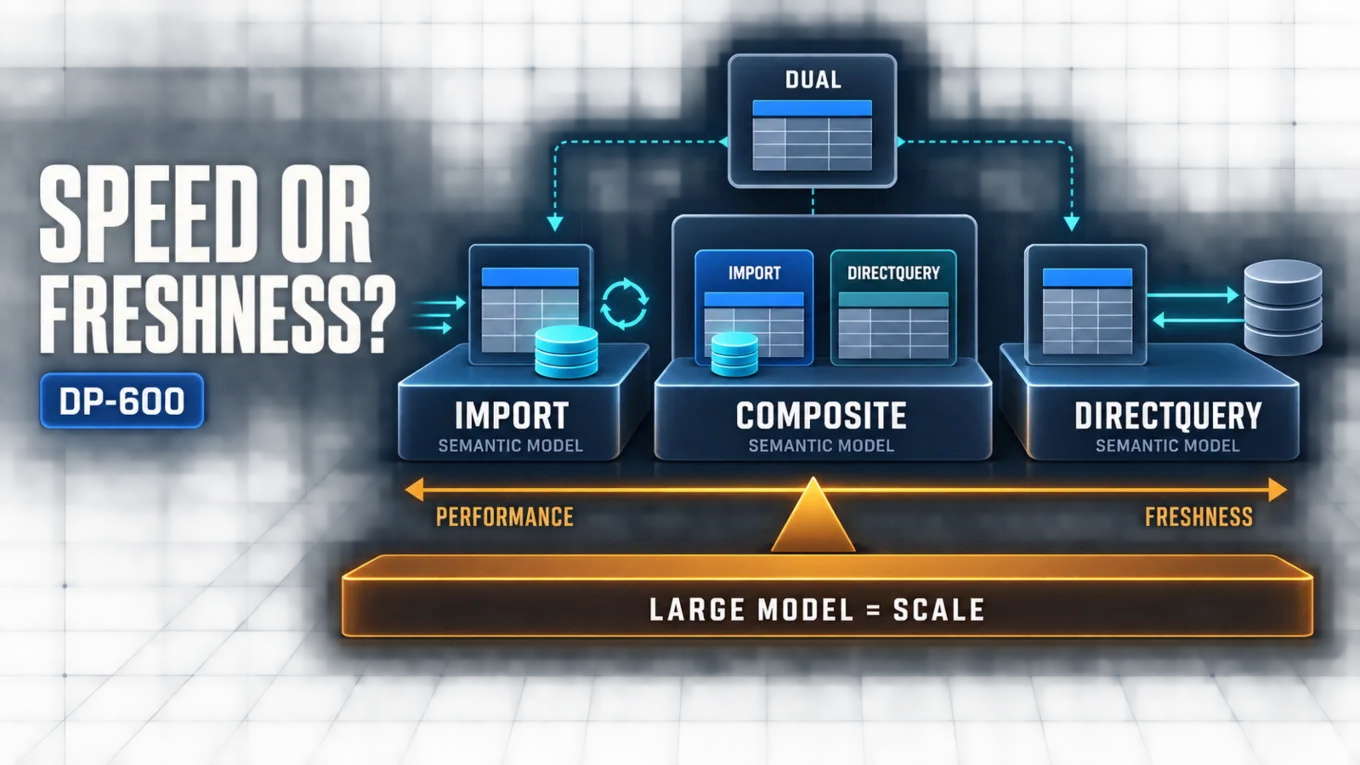
Choose Import when interactive speed and modeling flexibility matter most and scheduled freshness is acceptable. Choose DirectQuery when data must remain at the source or must be queried more recently than an import cycle permits, but only if the source can sustain the generated queries. Use a composite model when different tables need different choices, and use Dual selectively for shared dimensions that must support both cached and DirectQuery paths. Enable large semantic model storage format when an Import-heavy model needs the supported capacity envelope for a larger model; it expands how the model can be stored and managed, but it does not replace the table-level storage-mode decision.
This decision should be made against five constraints: required query responsiveness, acceptable data age, available capacity memory, load placed on each source, and required Power BI features. No mode wins every category. A sound enterprise design assigns the simplest mode that satisfies those constraints, proves it with a representative workload, and introduces mixed storage only where the benefit outweighs the operational complexity.
Storage Architecture Overview
A Power BI semantic model separates business semantics from data access. Relationships, measures, hierarchies, and display metadata define the analytical interface; table storage modes determine where data is held and how a query obtains it. Storage architecture therefore affects latency, resource consumption, refresh operations, source concurrency, and which modeling features can be used.
Microsoft's current semantic model modes documentation describes three model patterns: Import, DirectQuery, and composite. In a composite model, the setting is assigned at table level as Import, DirectQuery, or Dual. Large semantic model storage format is a separate model-level storage choice for supported large models, not a fourth table storage mode.
Use this sequence before selecting a mode:
- Define the maximum acceptable data age for each business process.
- Establish interactive latency and concurrency targets with representative reports.
- Estimate compressed model size, refresh working memory, and capacity headroom.
- Confirm that source systems can absorb query or refresh load without harming operational workloads.
- List required transformations, calculated objects, security behavior, and other feature dependencies.
- Choose the least complex architecture that meets all five tests, then validate it under realistic filters and peak concurrency.
Compare the Storage Options
| Option | Best fit | Main advantage | Principal tradeoff |
|---|---|---|---|
| Import | Data can be refreshed on an acceptable schedule and fits the available capacity envelope | Fast in-memory queries and broad modeling flexibility | Data is only as current as the last successful refresh; model and refresh consume memory |
| DirectQuery | Data must remain in the source, is impractical to import, or needs source-current query results | Avoids importing table data and shifts retrieval to the source | Interactive performance and concurrency depend on generated queries, network paths, and source capacity; some modeling features are restricted |
| Dual | A dimension in a composite model must efficiently participate in both cached and DirectQuery query paths | Lets Power BI choose cached or DirectQuery behavior for that table per query | Adds mode-dependent behavior and requires consistent source keys and carefully tested relationships |
| Composite model | Different tables or sources have materially different freshness, volume, or performance requirements | Mixes modes within one semantic model | Adds cross-source, relationship, security, refresh, and troubleshooting complexity |
| Large semantic model storage format | A supported capacity must host an Import-heavy model beyond the practical standard model envelope | Provides the storage and management foundation for larger semantic models | Does not reduce source volume, refresh cost, memory pressure, or inefficient model design by itself |
The table is a starting point, not a substitute for measurement. The same model can perform well for a small analyst group and fail at enterprise concurrency, while a source that handles one DirectQuery visual quickly may struggle when a report page issues several queries for hundreds of users.
Choose Import for Predictable Interactive Performance
Import stores compressed data in the semantic model and uses the in-memory engine for queries. It is normally the strongest default when the model fits capacity, refresh can meet the business freshness target, and the team needs broad transformation and calculation flexibility. Because report interaction does not normally send each visual query back to the operational source, Import also isolates source systems from ordinary report concurrency.
That speed has resource and freshness costs. Imported data must be refreshed, compressed, stored, and loaded into capacity memory. The Power BI mode guidance notes that an Import model must be loaded into memory as a complete model for querying; refresh also needs processing resources and additional memory. A design that barely fits during steady-state queries can therefore still fail or compete with other workloads during refresh.
Choose Import when all of these statements are true:
- The business accepts data as of the latest completed refresh.
- The compressed model plus refresh overhead fits within capacity with operational headroom.
- Fast and consistent interactive analysis is more important than querying each source change immediately.
- Transformations or semantic-model features would be constrained by DirectQuery translation requirements.
- Refresh traffic can be scheduled and governed without overloading sources.
Do not treat Import as permission to load every available column and row. Remove unused high-cardinality columns, preserve an analytical grain, and separate historical retention requirements from actual reporting needs. Detailed model reduction, refresh partitioning, and performance diagnosis belong in DP-600: Optimizing and Troubleshooting Enterprise-Scale Power BI Semantic Models.
Choose DirectQuery for Source-Current Access
DirectQuery keeps model metadata in Power BI while sending native queries to the underlying source when users interact with reports. It is appropriate when data volumes are impractical to import, policy requires data to remain at the source, or the freshness requirement cannot be met by scheduled import refreshes.
The trade is that report behavior becomes part of the source workload. Visual design, relationship paths, query translation, gateway or network latency, source indexes, source concurrency, and capacity query processing all affect the user's experience. Freshness is also not the same as guaranteed low latency: DirectQuery can request current source data and still deliver a slow result when the source path is expensive.
Before selecting DirectQuery, verify:
- The connector and transformations can produce efficient native queries for the target source.
- The source has a governed concurrency and resource plan for both interactive and background requests.
- Representative report pages meet latency targets, not just isolated test queries.
- The semantic design does not rely on calculated tables or other capabilities that the selected DirectQuery path does not support.
- Security identities and filters are tested through the entire query path.
- The business accepts dependency on source, gateway, and network availability during report use.
DirectQuery minimizes imported table data, but it does not eliminate Power BI processing. Power BI must generate and process source queries, and poorly shaped models or visuals can multiply requests. It should therefore be an evidence-based choice, not an automatic response to a large row count.
Use Dual to Support Shared Dimensions
Dual mode exists inside a composite model. A Dual table can behave as an in-memory Import table for one query and participate in a DirectQuery path for another. The common pattern is a reusable dimension—such as Date, Product, or Geography—related to both imported and DirectQuery facts.
For example, a Product dimension can answer slicer queries from its cache. When a visual combines Product with a DirectQuery Sales fact, Power BI can use the dimension in the DirectQuery path so that filtering can be expressed efficiently at the source. This can reduce unnecessary cross-engine work while retaining fast dimension browsing.
Dual is not a general performance switch. Use it only when a dimension genuinely needs both behaviors and when its keys, values, and refresh timing remain consistent with the DirectQuery facts. A stale Dual dimension can omit a newly arrived fact member from slicers even though the fact itself is current. Validate this condition explicitly whenever facts change more frequently than dimensions refresh.
Build Composite Models Along Business Boundaries
A composite model mixes Import and DirectQuery tables, can combine multiple DirectQuery sources, and may include Dual tables. Its value is selective compromise: stable dimensions and aggregated history can be cached, while a large or rapidly changing fact remains in DirectQuery. The architecture can serve requirements that neither a pure Import nor a pure DirectQuery model can satisfy alone.
Choose table modes by business role rather than by source convenience:
- Import small, stable dimensions and frequently reused aggregates when their refresh cadence is acceptable.
- Keep a fact in DirectQuery when its current data or source-residency requirement justifies the query dependency.
- Consider Dual for conformed dimensions shared across Import and DirectQuery paths.
- Keep relationship directions and business grain explicit so a mixed-mode query has one understandable route.
- Minimize cross-source joins and calculations that force data from different engines to be combined at query time.
Composite models increase the number of states a team must test. A visual may touch only cached tables, only DirectQuery tables, or both. Test each important path for correctness, latency, source query shape, security behavior, and failure handling. The underlying relationship architecture remains critical; DP-600: Designing Power BI Semantic Models and Relationships in Microsoft Fabric establishes that semantic foundation.
Apply a five-part table decision
For each table, record a decision in this order:
- Freshness: Can the table be as old as the next successful refresh, or must queries see source-current changes?
- Volume and memory: What is the expected compressed size, and what headroom remains during query and refresh peaks?
- Source load: Is it safer to pay controlled refresh cost or continuous interactive query cost?
- Feature needs: Do transformations, calculated objects, or other model behavior require Import capabilities?
- Query path: Will relationships make the table participate with Import, DirectQuery, or both kinds of tables?
If most tables independently resolve to Import, keep a pure Import model. If they resolve to DirectQuery and the source passes concurrency testing, keep a pure DirectQuery model. Adopt a composite model only when the recorded exceptions have meaningful business value.
Treat Large Model Storage as a Capacity Decision
Large semantic model storage format addresses the storage and management of large Power BI semantic models on supported capacity. It complements an Import or composite architecture; it does not decide whether an individual table is Import, DirectQuery, or Dual.
Evaluate it after reducing the model and estimating its steady-state and refresh footprint. The decision should include capacity support, expected growth, refresh working memory, concurrent model demand, deployment and backup processes, and the team's management tooling. Enabling the format does not make a needlessly wide model efficient, make refresh free, or protect a source from expensive extraction.
A useful rule is to separate two questions:
- How should each query reach table data? Answer with Import, DirectQuery, or Dual.
- How should the service store and manage this model at its intended scale? Answer with the supported model storage format and capacity plan.
Keeping those questions separate prevents a large-model setting from being mistaken for a performance optimization or freshness strategy.
Preserve the Direct Lake Boundary
Microsoft Fabric also supports Direct Lake for semantic models over applicable OneLake data. It is a distinct storage architecture with its own framing, refresh, fallback, guardrail, and security behavior. Do not infer those behaviors from Import, DirectQuery, Dual, or large-model rules.
This article's decision framework can identify a need for low-copy access to Fabric data, but the actual Direct Lake choice requires a separate evaluation. Continue with DP-600: Direct Lake Architecture, Refresh, Fallback, and Security before treating Direct Lake as the selected implementation.
Validate the Choice with a Workload Matrix
Document architecture evidence before release:
| Validation area | Evidence to collect |
|---|---|
| Freshness | Maximum observed data age and behavior after delayed or failed refresh |
| Interactive performance | Representative page latency under expected filters and concurrency |
| Memory | Model footprint during idle, query, and refresh periods with capacity headroom |
| Source load | Refresh duration or DirectQuery concurrency, query duration, and effect on the source workload |
| Feature compatibility | Required transformations, calculated objects, relationships, and security behavior tested in the chosen modes |
| Mixed-mode behavior | Cached-only, DirectQuery-only, and cross-mode visuals return correct results with acceptable latency |
| Operations | Ownership, monitoring, refresh or source failure handling, deployment, and rollback are defined |
Use production-shaped data and report pages. A storage-mode proof based on a small sample can hide compression, cardinality, concurrency, and source-query problems that appear only at scale.
Common Storage-Mode Mistakes
Choosing DirectQuery only because the source is large
Large source volume does not prove that every row and column belongs in the semantic model. First reduce the analytical scope and estimate Import compression; then compare controlled refresh cost with continuous source-query cost.
Calling DirectQuery automatically real-time
DirectQuery requests current source results, but total latency and availability still depend on query translation, the source, the network, and Power BI processing. Define a measurable freshness and response target.
Marking every dimension as Dual
Dual is valuable when a dimension crosses cached and DirectQuery paths. Applying it indiscriminately increases refresh and consistency responsibilities without guaranteeing a better query plan.
Building a composite model without testing cross-mode queries
Tests that touch only one mode miss the architecture's hardest paths. Validate visuals that combine dimensions, measures, and facts across modes under representative concurrency.
Treating large model storage as a tuning feature
The format supports model scale; it does not fix excessive cardinality, inefficient relationships, refresh pressure, or slow report design. Size reduction and performance tuning remain separate work.
Certification Relevance
The current DP-600 study guide includes choosing a storage mode, creating a large-model storage format, and designing composite models within semantic-model implementation. The practical skill is to justify architecture from workload evidence: explain where data resides, how current it must be, which engine answers each query, what resources are consumed, and which capabilities remain available.
Preparation should therefore include comparing two realistic workloads, predicting which source each visual will touch, and defending each table's mode. That approach tests transferable engineering judgment without reconstructing exam questions.
Conclusion
Use Import as the default for fast, flexible analysis when refresh freshness and capacity fit are acceptable. Use DirectQuery when source residency, scale, or source-current access outweighs its query-path constraints. Use Dual and composite models only to resolve clear table-level differences, and treat large semantic model storage format as a separate scale and capacity decision. Validate the result across freshness, memory, source load, features, correctness, and concurrency before release.
Authoritative Sources
- Study guide for Exam DP-600
- Semantic model modes in the Power BI service
- Semantic models in Microsoft Fabric