
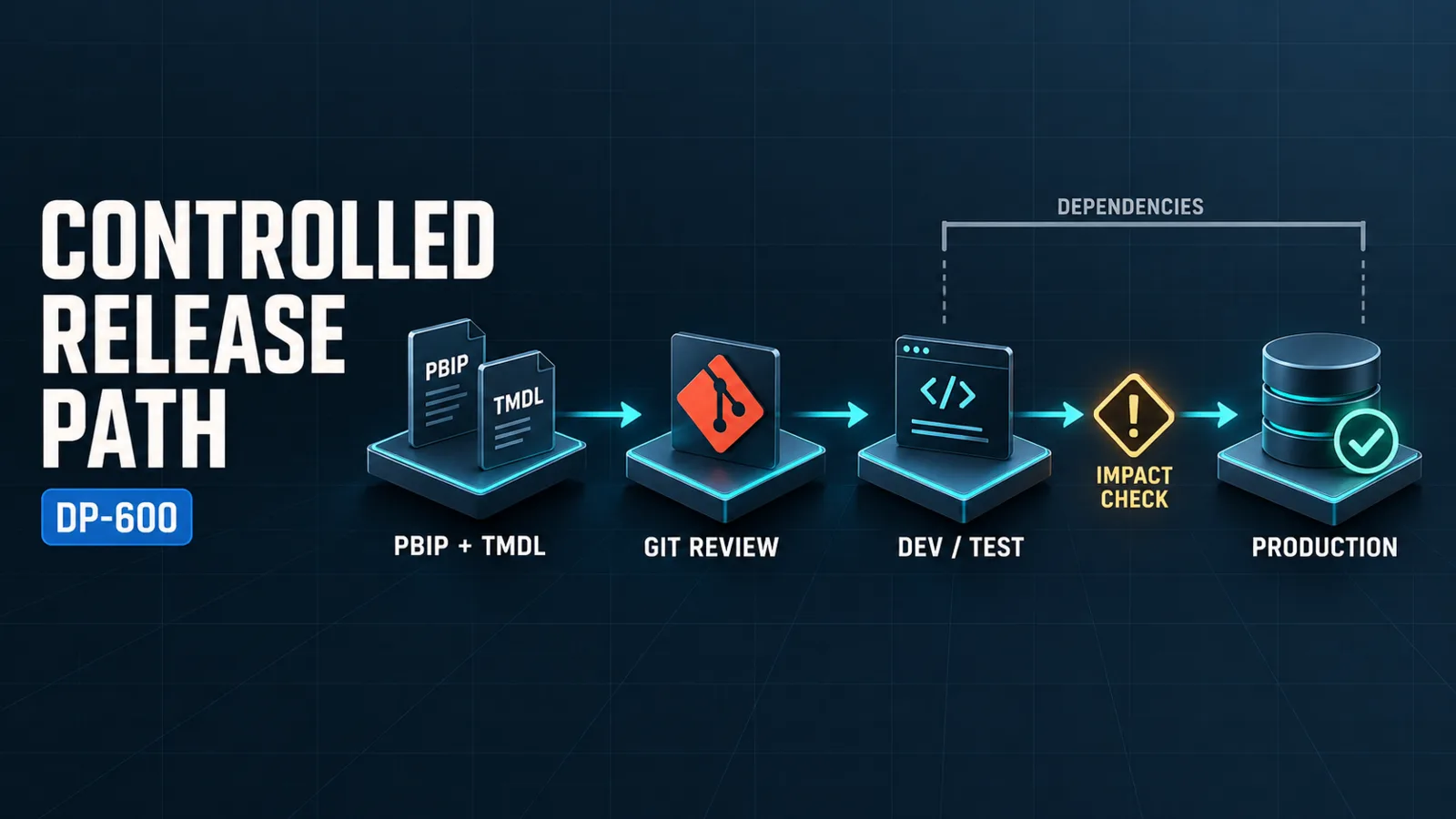
A Fabric analytics team should use one controlled path from editable source to a validated production release: develop source-control-friendly artifacts, review changes in Git, synchronize them to an isolated development workspace, promote tested content through deployment pipeline stages, and check dependencies before and after release. Power BI Desktop projects, Tabular Model Definition Language, impact analysis, the XML for Analysis endpoint, and reusable Power BI assets each support a specific part of that path; none replaces the release controls around it.
The practical procedure is to establish ownership and environments first, author Power BI content as a Power BI Desktop project (PBIP), commit reviewable changes, integrate the development workspace with Git, validate the connected solution, promote supported items through a deployment pipeline, and then verify bindings, refresh, security, and downstream consumers. Use the XML for Analysis (XMLA) endpoint only for governed semantic-model operations, and use Power BI template (PBIT) files, Power BI data source (PBIDS) files, or shared semantic models according to what must be reused. Because Microsoft Fabric is a continuously updated service, confirm current item support and limitations in the Fabric CI/CD documentation before standardizing the workflow.
Architecture Overview
Microsoft Fabric analytics lifecycle management works best as a set of cooperating control layers:
- Authoring layer: Power BI Desktop and PBIP provide editable project artifacts. Tabular Model Definition Language (TMDL) makes semantic-model metadata available as text when the project uses the TMDL serialization format.
- Version-control layer: Fabric Git integration and the team's repository preserve change history and enable branch, pull-request, and review policies outside the production workspace.
- Environment layer: Separate development, test, and production workspaces limit the blast radius of a change. Workspace access remains part of the security design, not merely a convenience for deployment.
- Promotion layer: Deployment pipelines move supported Fabric and Power BI items between defined stages. They provide promotion structure, but teams must still validate environment-specific connections, parameters, bindings, permissions, and refresh behavior.
- Dependency layer: Lineage and impact analysis help identify downstream content that could be affected by a semantic-model or report change.
- Management and reuse layer: The XMLA endpoint supports governed semantic-model connectivity and management, while PBIT, PBIDS, and shared semantic models distribute different kinds of reusable assets.
These layers separate two concerns that are often confused. Git records and reviews source changes; a deployment pipeline promotes deployable service items between environments. A commit does not prove that an item works in a target workspace, and a successful deployment does not prove that the source change received adequate review.
Core Lifecycle Components
Git integration and workspace isolation
Fabric continuous integration and continuous delivery (CI/CD) combines Git integration, deployment pipelines, APIs, and related tooling. Connect Git to the development workspace rather than treating a production workspace as an authoring location. Apply repository controls such as protected branches and pull requests according to the organization's engineering policy, then let approved source reach the connected development workspace through the team's chosen synchronization process.
Git integration is not a universal backup mechanism or a guarantee that every Fabric item has identical source-control behavior. Supported item types, serialized properties, cross-workspace dependencies, and synchronization behavior can differ and can change as the service evolves. Before adopting Git as the recovery path for an item, verify that the item's complete required definition is represented and test restoration in a nonproduction workspace.
PBIP and TMDL as reviewable source
A Power BI Desktop project stores a Power BI solution in a folder-based format represented by a .pbip project file and related project folders. As verified on September 22, 2026, Microsoft still labels Power BI Desktop projects as Preview, and saving in PBIP format requires enabling the Power BI Project (.pbip) save option under Preview features. Recheck that status and the documented limitations before standardizing PBIP in a production lifecycle. The folder structure is better suited to source control and automated processing than treating a single binary report file as the only development artifact, and it makes report and semantic-model definitions easier to review separately.
Tabular Model Definition Language (TMDL) expresses tabular semantic-model metadata as text. In a PBIP workflow that uses TMDL serialization, developers can inspect and review model changes at a more meaningful level than a binary-file comparison. Power BI Desktop also provides a TMDL view for scripting model metadata. TMDL is powerful enough to make broad model changes, so generated or bulk-edited scripts should be reviewed and tested before they replace known-good metadata.
Source control must include the complete project structure and respect the files that Microsoft marks as local or user-specific. Avoid renaming, moving, or editing generated project files without understanding their role. A clean text diff is evidence of what changed, not evidence that the report opens, the model processes, or the service accepts the deployment.
Deployment pipelines and environment controls
A deployment pipeline supplies ordered environments for controlled promotion. A typical team assigns development, test, and production workspaces to stages, deploys an approved set of changes forward, runs environment-specific validation, and promotes again only after the release criteria pass.
Use the pipeline as a release boundary, not as a substitute for environment design. Each target can require different data-source connections, parameters, gateway or cloud-connection mappings, refresh schedules, permissions, and credentials. Keep secrets out of source-controlled project files, and verify that a deployment has not unintentionally retained a development connection or changed an expected binding.
Deployment support is item-specific. A pipeline may not promote every related artifact or external dependency as one atomic unit, and supported properties can differ by item type. Consult the current CI/CD documentation, inventory all dependencies, and document any manual or automated steps needed around the deployment. If a release contains multiple coupled items, promote them in a deliberate order and define a recovery plan before changing production.
Impact analysis and dependency evidence
Impact analysis belongs before approval and after deployment. Before promotion, inspect lineage and use impact analysis where available to locate reports, dashboards, and other downstream content that depend on a changed semantic model. Classify each dependency as compatible, requiring coordinated change, or outside the team's control. Notify owners when a contract change could break their content.
After deployment, repeat targeted checks in the destination environment. Confirm that expected consumers still bind to the intended semantic model, representative reports load, scheduled refresh or DirectQuery connectivity behaves as designed, and access remains appropriate. Impact analysis reveals known relationships in the service; it cannot prove that every external client, exported artifact, embedded application, or undocumented dependency is safe. Maintain an owner and consumer inventory for critical shared assets.
XMLA for governed semantic-model operations
The XMLA endpoint exposes Analysis Services-compatible connectivity for Power BI semantic models. With supported capacity, workspace permissions, and tenant or capacity settings, approved tools and automation can inspect or manage model metadata and operational objects. This is useful when a lifecycle requires semantic-model deployment or administration beyond interactive Power BI Desktop publishing.
Treat XMLA write operations as privileged production changes. Test scripts against development or test models, use least-privilege identities, capture execution logs, and protect credentials. Check current licensing, capacity, endpoint mode, tool compatibility, and permission requirements before relying on an XMLA-based release. An XMLA operation manages the semantic model; it does not automatically promote the reports, data pipelines, workspace configuration, or other Fabric items that surround it.
Reusable Power BI assets
Choose a reusable asset by the contract the recipient needs:
| Asset | Reuses | Appropriate lifecycle role | Important boundary |
|---|---|---|---|
| PBIT | A Power BI report and model starting structure without the imported data | Starting a new solution from an approved pattern | A copied template can diverge; it is not a centrally governed live model |
| PBIDS | Data-source connection information for opening a supported source in Power BI Desktop | Standardizing how authors begin a connection | It does not distribute credentials, a finished report, or a semantic model |
| Shared semantic model | A centrally managed semantic layer consumed by multiple reports | Reusing measures, relationships, and governed business definitions | Model changes can affect many consumers and require impact analysis |
The Power BI Desktop data-source documentation describes PBIDS as a data-source connection file that can be opened in Power BI Desktop. It is a connection bootstrap, not secret storage. PBIT is suitable when consumers need an editable starting point. A shared semantic model is the stronger choice when the goal is one maintained business definition with multiple reports, but centralized reuse increases the importance of compatibility testing and consumer communication.
How the Components Work Together
1. Establish the release contract
Define development, test, and production workspace ownership; repository and branch policies; allowed deployment identities; approval gates; and recovery responsibility. Record which items are supported by Git integration and deployment pipelines and which require a separate controlled step. Align workspace and item access with the controls described in DP-600: Securing and Governing Microsoft Fabric Analytics Solutions.
2. Author a complete, reviewable change
Save Power BI work as PBIP where the format fits the solution. Use TMDL when text-based semantic-model metadata improves review or automation. Keep the project intact, exclude only documented local artifacts, and make one coherent change per branch. Validate that the project opens and that the changed report and model behave correctly before requesting review.
3. Review source and dependency effects
Review diffs for intentional report, query, and model changes. In addition to code review, identify changes to fields, measures, relationships, table names, data sources, and parameters that could alter a public analytical contract. Use lineage and impact analysis where available, and coordinate changes with the owners of affected reports or processes.
4. Synchronize and validate development
Merge through the repository's approved path, synchronize the development workspace, and resolve conflicts deliberately. Run functional checks in Fabric: open representative reports, test connectivity, refresh or query a controlled sample, and verify the expected permissions. Do not infer service validity solely from a successful Git synchronization.
5. Promote through test
Deploy the approved items to the test stage. Apply or verify target-specific configuration, then test data connections, refresh, report rendering, semantic-model compatibility, and access. Execute any separately governed XMLA operation only after its prerequisites and target are confirmed. Capture evidence that ties the tested artifact and configuration to the proposed production release.
6. Promote and verify production
Promote the same approved release to production during an appropriate change window. Confirm deployment results, bindings, credentials or connections, refresh behavior, permissions, and representative downstream reports. Recheck impact evidence and monitor for failures that appear only under production identity, scale, or scheduling conditions. If validation fails, stop further changes and follow the prepared recovery procedure.
7. Publish reusable assets deliberately
Distribute a PBIT when users should create independent solutions from a governed starting point, a PBIDS when they need a standardized connection entry point, or access to a shared semantic model when reports should depend on a maintained analytical contract. Give each reusable asset an owner, version or change record, intended audience, and support path.
Design Considerations
Make the deployable unit explicit
A release can span reports, semantic models, lakehouses, warehouses, pipelines, and external connections, but the tools do not necessarily treat that collection as one transaction. Define the deployable unit and its dependency order. If one component cannot be represented in Git or promoted through the same pipeline, manage it as an explicit release step instead of an undocumented exception.
Separate source, configuration, and secrets
Keep source definitions reviewable, keep environment-specific configuration controlled, and store secrets only in approved credential or connection mechanisms. Review configuration differences at every stage. This separation reduces the risk of committing secrets and of deploying development endpoints into production.
Protect shared contracts
Treat a shared semantic model as an interface used by downstream reports. Prefer additive, backward-compatible changes when practical; coordinate removals and renames; and use impact analysis before changing fields or measures. The internal design of model relationships belongs in DP-600: Designing Power BI Semantic Models and Relationships in Microsoft Fabric; the lifecycle concern here is how to change and release that model safely.
Design for recovery
Source history is only one recovery input. Retain the approved commit or release identifier, target configuration, deployment evidence, and any required semantic-model backup or restoration procedure appropriate to the organization's platform design. Test recovery in a nonproduction environment. Fabric and Power BI service changes can affect supported deployment behavior, so periodically revalidate the process against current documentation.
Common Mistakes
- Using a production workspace for development: Direct editing weakens review, reproducibility, and recovery. Develop and validate in isolated workspaces.
- Assuming Git and deployment pipelines are interchangeable: Git governs source history; pipelines govern stage-to-stage promotion of supported items.
- Treating synchronization as a test pass: A successfully synchronized definition can still have broken connections, refresh, permissions, or downstream reports.
- Ignoring unsupported or external dependencies: Inventory anything that requires an API, XMLA, manual configuration, or separate deployment process.
- Running XMLA writes without production controls: A technically valid script can still target the wrong model or make a wide metadata change. Require target checks, least privilege, logs, and tested recovery.
- Committing credentials or environment-specific secrets: Keep secrets in approved service-managed connection or credential mechanisms.
- Using PBIT, PBIDS, and shared semantic models as if they solve the same problem: Select between reusable starting content, a connection bootstrap, and a centrally maintained semantic layer.
- Changing a shared model without impact analysis: Downstream reports can depend on names, measures, fields, relationships, and refresh behavior that appear local to the model author.
Certification Relevance
For Exam DP-600: Implementing Analytics Solutions Using Microsoft Fabric, lifecycle competence means understanding how source control, authoring formats, promotion stages, dependencies, management interfaces, and reusable assets form one operational system. The current DP-600 study guide establishes this lifecycle scope; product documentation determines the current behavior and limitations of each tool.
Focus on the responsibility of each component and the validation required at its boundary. A sound design can explain why a team uses PBIP and TMDL for reviewable development, Git for controlled source history, deployment pipelines for staged promotion, impact analysis for dependency risk, XMLA for governed semantic-model operations, and PBIT, PBIDS, or shared semantic models for distinct reuse needs. A broader hands-on sequence is available in DP-600: Study Plan and Hands-On Lab Roadmap.
Conclusion
A reliable Fabric analytics lifecycle is a chain of evidence: an approved source change, a valid development deployment, known dependency effects, a tested target configuration, and verified production behavior. No single tool supplies all of that evidence. Teams reduce release risk by assigning Git, PBIP and TMDL, deployment pipelines, impact analysis, XMLA, and reusable Power BI assets to their proper roles and by explicitly managing the gaps between them.
Authoritative Sources
- Study guide for Exam DP-600
- Introduction to CI/CD in Microsoft Fabric
- Power BI Desktop developer mode documentation
- Power BI Desktop projects (PBIP)
- TMDL view in Power BI
- Connect to semantic models with the XMLA endpoint
- Data sources in Power BI Desktop
- Semantic models in Microsoft Fabric