
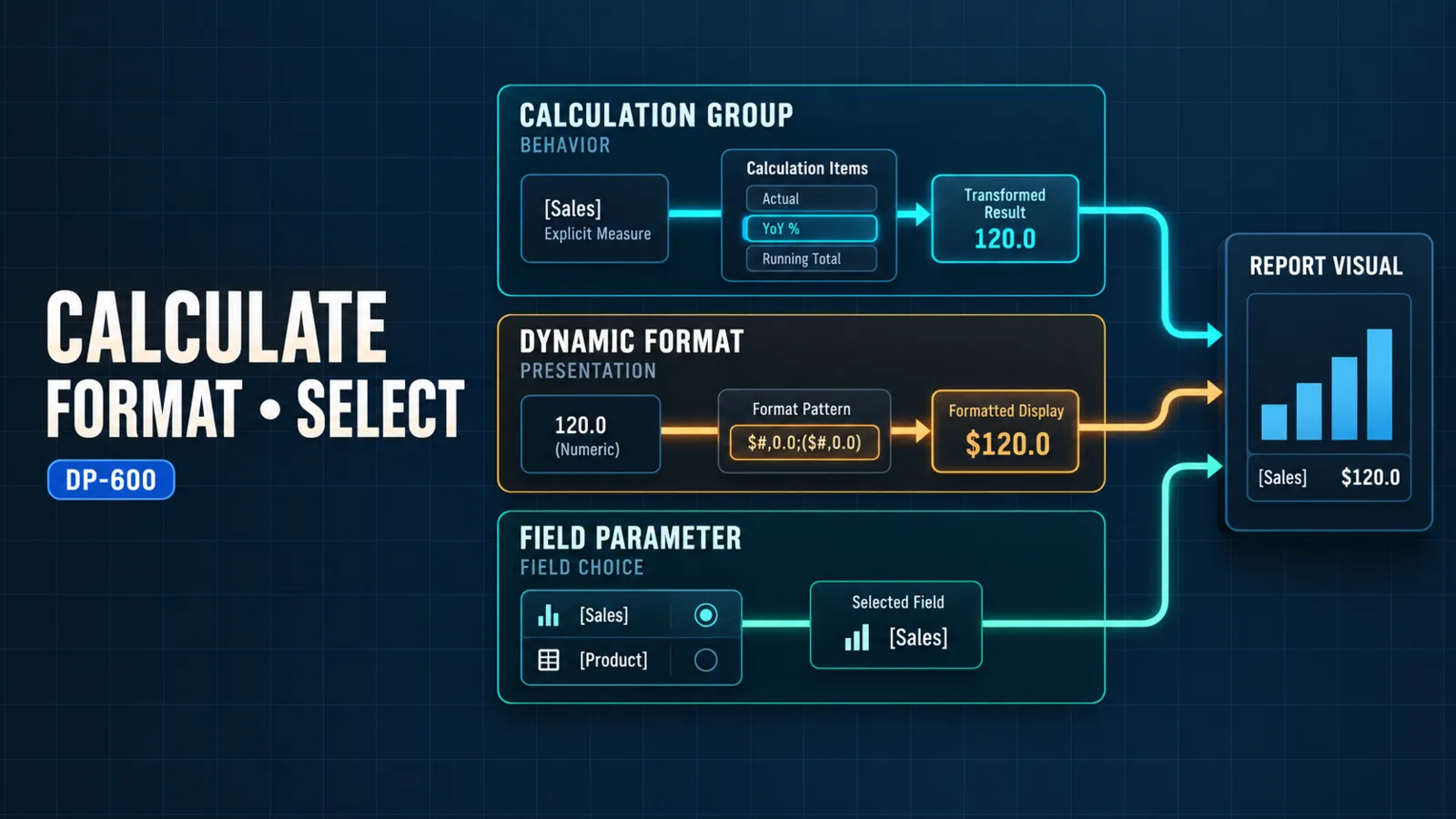
Use a calculation group when the same calculation transformation must apply to many explicit measures, a dynamic format string when a measure's displayed format must change with context without converting its value to text, and a field parameter when report users must choose which existing dimensions or measures a visual displays. These features can work together, but their responsibilities are different: calculation items change calculation behavior, format-string expressions change presentation, and field parameters change the field selection supplied to a visual.
The choice should follow the kind of repetition being removed. Repeated time comparisons or scenarios point to calculation groups. Repeated currency, unit, or percentage formatting points to dynamic format strings. Repeated versions of the same visual that differ only by axis or measure point to field parameters. None of the three replaces a well-designed Data Analysis Expressions (DAX) measure, relationship model, or storage architecture.
Compare the Three Responsibilities
The following decision table keeps the model, formatting, and report-interaction layers separate.
| Requirement | Use | What it controls | What it does not control |
|---|---|---|---|
| Apply current period, prior period, year-over-year, or another reusable transformation across many measures | Calculation group containing calculation items | DAX evaluation of the selected explicit measure | The base measure definition, table storage mode, or visual field choice |
| Show one numeric measure as currency, percentage, whole units, or scaled units according to context | Dynamic format string on a measure or calculation item | The format string used to display the numeric result | The underlying numeric result or the fields placed in a visual |
| Let a report user switch a visual between Revenue, Margin, and Units, or between Product and Region | Field parameter | Which modeled fields or measures the visual evaluates and displays | The DAX definition of those measures or their model-wide formatting logic |
| Reuse a transformation and give each transformed result an appropriate format | Calculation item plus its dynamic format string | Calculation behavior and corresponding presentation | User selection of unrelated axes or measures unless a field parameter is also used |
This separation prevents a common design error: treating every kind of report flexibility as a new measure. A model should keep stable business logic in explicit measures, reuse cross-measure transformations through calculation items, preserve numeric types through dynamic format strings, and expose intentional visual choices through field parameters.
Calculation Groups and Calculation Items
A calculation group is a semantic-model object that organizes one or more calculation items. The group supplies a column that can be placed in a slicer, filter, row, or column. Each calculation item is a named DAX expression that transforms the explicit measure currently being evaluated.
Within a calculation item, SELECTEDMEASURE() acts as the placeholder for that current measure. A simple calculation item might return the measure unchanged:
SELECTEDMEASURE()
Another item can evaluate the selected measure under a modified filter context, such as a documented prior-period rule. The value of the pattern is reuse: instead of creating a current-period, prior-period, and variance version for every base measure, the model defines the transformation once and applies it to eligible measures.
Calculation groups and calculation items are not interchangeable terms. The group is the container and selection surface; the items are the individual transformations within it. Naming should make both levels clear. For example, a Time Calculation group could contain Current, Prior Year, and Year-over-Year % items.
Microsoft documents an important model requirement: calculation items apply to explicit measures, not implicit measures created when a numeric column is dropped directly into a visual. Adding a calculation group enables the model's discourage-implicit-measures behavior, which means model authors should define and govern the base measures that the group is expected to transform. The current calculation groups documentation also describes using calculation-group columns in visuals and configuring precedence when more than one group can affect a measure.
Design calculation items around a governed measure set
Do not assume that every calculation item is valid for every measure. A time transformation may make sense for revenue and order count but not for a text-returning title measure. A percentage item might need a different format from the underlying currency measure. Define the intended measure set, test exclusions, and make inapplicable behavior deliberate.
When multiple calculation groups exist, precedence determines the order in which their transformations apply. Treat precedence as part of the semantic design, not as a late correction. Test combinations such as time calculation plus scenario calculation because individually correct items can produce a different result when composed.
Dynamic Format Strings Preserve Numeric Semantics
A dynamic format string uses a separate DAX expression to select a format string according to filter context. The measure result remains numeric, so visuals can continue to aggregate it, place it on a numeric axis, and apply numeric behavior. This is the key difference from using the FORMAT function in the measure expression, which returns text.
Use a measure-level dynamic format string when one measure needs context-sensitive presentation. For example, a converted sales measure can select a currency pattern from a governed format table. Use a calculation-item dynamic format string when the appropriate format belongs to the reusable transformation—for example, a year-over-year percentage item that should display as a percentage even when it transforms a currency measure.
The dynamic format strings documentation confirms that the format expression is separate from the measure expression and that the measure retains its data type. That boundary matters: a format string can add symbols, decimal patterns, or scaling conventions, but it must not be used to imply a unit conversion that the numeric measure did not calculate.
Keep calculation and presentation logic aligned
Formatting is trustworthy only when it describes the value correctly. If a slicer changes currency, the numeric expression must perform the currency conversion while the format-string expression selects the corresponding currency pattern. Changing the symbol alone would relabel an unchanged value.
Provide a safe default when context does not select one valid format. Also test totals and multi-select states. A format expression that assumes a single currency or unit can become ambiguous even when the underlying measure still returns a valid number.
Field Parameters Control Visual Field Selection
A field parameter provides a curated list of dimensions or measures that a report visual can use. When the parameter is connected to a slicer, a report user can switch a chart axis from Product to Region or switch the displayed value from Revenue to Margin without the author maintaining separate copies of the visual.
Field parameters therefore operate at the report-interaction boundary. They reference existing model fields or measures; they do not rewrite those objects. If the user selects Margin, the existing Margin measure still owns the calculation. If that measure has a dynamic format string, its formatting behavior remains attached to it. If a calculation item is also selected, the item transforms the selected eligible measure according to the calculation-group logic.
Use a field parameter only for choices that are meaningful and safe to compare in the same visual. A long list of unrelated fields transfers model complexity to the report user. Prefer a short, named set with a predictable sort order and labels that describe business concepts rather than physical column names.
Plan interaction states explicitly
Test single selection, multiple selections, and no effective selection according to the slicer's configuration. Verify that visual titles, tooltips, axis labels, and accessibility text still explain what is shown. If measures with different units can be selected together, confirm that the visual and its formatting communicate those units unambiguously.
Field parameters are not a security boundary. They improve controlled exploration, but they do not grant or restrict access to the referenced data. Apply security and object visibility through the appropriate model and service controls.
Combine the Features Without Mixing Their Roles
Consider a sales report that lets a user select Revenue, Margin, or Orders and then apply Current, Prior Year, or Year-over-Year %.
- Explicit measures define Revenue, Margin, and Orders.
- A field parameter lets the visual switch among those measures.
- A calculation group supplies the reusable time calculation items.
- Each calculation item preserves the selected measure's format by default or supplies a suitable dynamic format string when the transformation changes the unit, such as a percentage comparison.
The field parameter answers “which measure should the visual show?” The calculation item answers “which reusable transformation should apply?” The dynamic format string answers “how should the resulting numeric value appear?” Keeping those questions separate makes the interaction easier to test and prevents report logic from being duplicated across visuals.
Implementation Considerations
Establish the base-model contract first
Create explicit, validated measures before introducing calculation groups or field parameters. Confirm their grain, filter behavior, units, totals, and blank handling. If a base measure is unreliable, a reusable transformation multiplies the defect across every report that uses it. The prerequisite guide, DP-600: Advanced DAX Patterns for Enterprise Semantic Models, explains how to make those measures reviewable.
Test the interaction matrix
Test each supported base measure against each calculation item and its expected format. Then test the permitted field-parameter selections in the intended visuals. Include totals, blank contexts, multi-selection, and measures that calculation items should bypass. For multiple calculation groups, also test precedence combinations.
Keep storage and performance decisions outside this feature choice
Calculation groups, dynamic format strings, and field parameters do not select Import, DirectQuery, Dual, composite, or Direct Lake storage. They operate after the semantic model and its measures have been designed. Their expressions and combinations can still add evaluation work, and a field parameter can cause a visual to request a more expensive measure, but changing one of these features is not a substitute for diagnosing the model, source, DAX, or visual layer.
Measure performance with the actual visual and selection combinations. If results are slow, follow the layered workflow in DP-600: Optimizing and Troubleshooting Enterprise-Scale Power BI Semantic Models rather than assuming the interaction feature itself identifies the bottleneck.
Govern names and ownership
Use names that tell report authors whether an object is a base measure, calculation choice, format rule, or field selector. Document who can add items or parameter choices, and regression-test dependent reports when those lists change. Reuse is valuable only when the shared behavior remains predictable.
Common Design Mistakes
Creating calculated measures for every combination
Duplicating base measures for every time, scenario, and format combination increases maintenance and makes corrections inconsistent. Use calculation items for genuinely reusable transformations, but keep exceptional business rules in explicit measures when they do not share the same semantics.
Formatting by converting the value to text
Using a text result for display can break numeric axes and aggregations. Prefer a dynamic format string when the value should remain numeric, and keep actual unit or currency conversion in the measure expression.
Treating a calculation item as a calculation group
A group is the container and selectable column; an item is one transformation. Confusing the two makes precedence, selection behavior, and naming difficult to reason about.
Using a field parameter to conceal an incoherent model
A parameter can switch among fields, but it cannot repair ambiguous relationships, mismatched grain, or inconsistent measures. Establish the semantic-model structure first, as described in DP-600: Designing Power BI Semantic Models and Relationships in Microsoft Fabric.
Ignoring unsupported or ambiguous selections
Not every transformation applies to every measure, and not every group of fields is meaningful in one visual. Restrict the available choices, define fallbacks, and test invalid or multiple-selection states instead of relying on a convenient demonstration path.
Conclusion
Choose calculation groups for reusable cross-measure transformations, dynamic format strings for context-aware numeric presentation, and field parameters for user-selectable visual fields. Calculation items live inside calculation groups and contain the DAX transformation; dynamic format expressions describe the resulting value without changing its numeric type; field parameters select existing model objects without redefining their logic.
Implement them only after the base measures and relationships are correct, test their combinations deliberately, and keep storage-mode selection and performance diagnosis in their own design workflows. That separation produces a reusable semantic model without blurring calculation, presentation, interaction, and engine responsibilities.
Authoritative Sources
- Study guide for Exam DP-600
- Calculation groups in Power BI
- Dynamic format strings for measures
- Use field parameters to let report readers change visuals
- Power BI guidance documentation