
Introduction
An organization should adopt a built-in Microsoft Copilot experience when a common productivity need is already supported, use Agent Builder for a focused lightweight agent, and evaluate Microsoft Copilot Studio for richer workflows, actions, integrations, deployment, or lifecycle control.
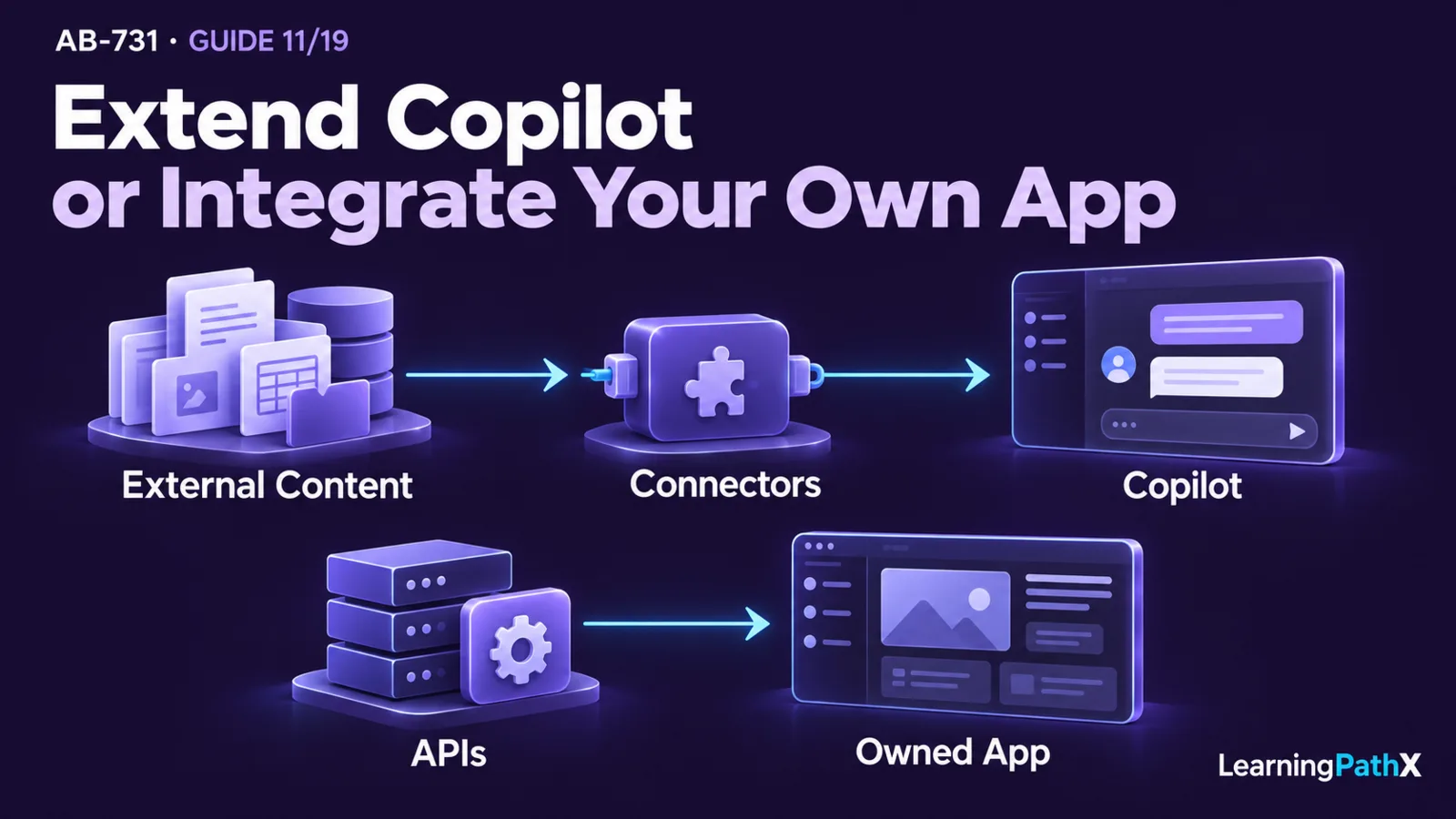
For extensibility, first decide where people will use the result. Add supported agents, Microsoft 365 Copilot connectors, or tools when the capability belongs inside Copilot. Use application programming interfaces (APIs), such as Microsoft Work IQ API or Microsoft 365 Copilot APIs, when an application or custom agent the organization owns needs Microsoft 365 work context or a supported Copilot capability. Build a wider custom solution when differentiation or control requires responsibilities beyond the packaged and supported extension options. These paths can be combined; each component retains its own access, deployment, and operating requirements.
Choose the least complex option that satisfies the business outcome, audience, data, action, governance, and lifecycle requirements. Start with the packaged capability, then add only the extension or custom responsibility the process actually needs. The right choice is not the option with the most features; it is the smallest supportable solution whose owners can evaluate, secure, operate, and improve it.
Architecture Overview
Build, buy, or extend is a decision about where solution responsibility sits. A built-in experience places more capability and lifecycle responsibility in the Microsoft service. Inside Copilot, an agent can add organization-specific instructions, knowledge, or actions, while a connector can bring approved external content into grounding. In an owned application or custom agent, an API can supply work context or supported Copilot capabilities, while the organization operates the surrounding experience. A wider custom solution moves more experience design, engineering, evaluation, security, deployment, and operations to the organization.
Microsoft's extensibility overview, updated October 12, 2026 and verified October 16, explicitly distinguishes capabilities inside Copilot from APIs and software development kits (SDKs) used in owned applications and agents. Current product documentation calls the productivity solution Microsoft Copilot, formerly Microsoft 365 Copilot, while some connector and API names retain Microsoft 365 Copilot during the transition. These paths should be treated as architectural building blocks rather than a maturity ladder.
| Decision path | Best starting signal | Responsibility the organization accepts |
|---|---|---|
| Built-in Microsoft Copilot | The supported experience already addresses a common work task | Adoption, permissions, information governance, user guidance, and outcome measurement |
| Agent Builder | A focused audience needs lightweight tailoring of instructions and knowledge | Agent purpose, sources, sharing, testing, and maintenance |
| Microsoft Copilot Studio | A managed low-code agent needs richer workflows, actions, integration, or deployment control | Solution design, connections, actions, governance, release, monitoring, and support |
| Microsoft 365 Copilot connectors | Existing Copilot surfaces need approved external organizational content | Source governance, identity, permissions, synchronization or federation behavior, data quality, and connector lifecycle |
| Microsoft Work IQ API | A custom application must reason over signed-in-user Microsoft 365 work context | Consumption governance, user-context authorization, compliance controls, application lifecycle, and failure handling |
| Microsoft 365 Copilot APIs | A custom application needs a supported Copilot capability through an API | Integration design, identity, eligibility, API lifecycle, user experience, and failure handling |
| Custom AI solution | The experience or orchestration is strategically distinct or exceeds Copilot extension boundaries | Full application, model, data, security, evaluation, deployment, and operating lifecycle |
The table identifies the first option to evaluate. Several paths can coexist, but every added component needs a clear responsibility and owner. Using an API does not by itself determine how an agent is packaged, distributed, or governed; check those requirements for the selected runtime and channel.
Core Components
Built-in Microsoft Copilot experiences
Choose a built-in experience first when it already fits the users, work surface, and outcome. Microsoft Copilot, formerly Microsoft 365 Copilot, coordinates large language models, Microsoft Graph content, and Microsoft 365 apps. The current AB-731 guide still uses Microsoft 365 Copilot in its exam wording, but general product references should follow the current Microsoft Copilot name.
Buying or adopting a packaged capability does not eliminate organizational work. Leaders still need to verify permissions, prepare content, define acceptable uses, train users, monitor adoption and quality, and assign support ownership. The advantage is that the organization avoids creating a separate application when the supported product already solves the process need.
Agent Builder for lightweight agents
Agent Builder is appropriate when people using Microsoft Copilot need a focused agent that can be created with relatively lightweight configuration. A useful candidate has a bounded purpose, identifiable knowledge, clear instructions, a defined audience, and limited operational complexity.
Lightweight does not mean unmanaged. The owner should document what the agent is allowed to answer, which sources it uses, who may access it, how it is tested, and who updates or retires it. If the use case requires more sophisticated actions, integrations, deployment control, governance, or lifecycle management, evaluate Microsoft Copilot Studio instead.
Microsoft Copilot Studio for managed low-code solutions
Microsoft Copilot Studio is a graphical low-code product for building agents and workflows. Microsoft's Agent Builder and Copilot Studio decision guidance compares the two experiences by audience, scope, capabilities, governance, and licensing considerations.
Use Microsoft Copilot Studio when the agent must coordinate a more structured process, connect to additional systems, take approved actions, or operate under a managed solution lifecycle. That choice creates responsibilities for connection security, authentication, authorization, input validation, exception handling, testing, release management, monitoring, and support. A graphical tool can reduce some development effort, but it does not remove solution engineering or governance.
Copilot connectors for additional organizational content
A Copilot connector is relevant when an existing Copilot experience needs approved content beyond the information already available through Microsoft 365. The connector extends the grounding boundary; it does not automatically make the source authoritative, current, complete, or safe.
Before connecting a source, identify its owner, access model, update frequency, content quality, sensitivity, deletion behavior, and expected search patterns. Preserve source permissions where the connector supports that model, and test results with representative user roles. Broadening content access merely to improve retrieval can expose information outside the intended business purpose.
Microsoft Work IQ API for permission-aware work context
Microsoft Work IQ API is relevant when an owned application or custom agent must reason over Microsoft 365 work context such as emails, meetings, files, and organizational knowledge. This is a user-scoped work-context path, with access constrained by the applicable Microsoft 365 permissions and documented governance controls. It supplies context to the owned experience; a connector instead brings approved external organizational content into Copilot.
The organization still owns the application experience, authorization flow, consumption controls, exception handling, evaluation, and support. Use Work IQ API when permission-aware work context is the requirement. Microsoft 365 Copilot APIs expose supported Copilot capabilities under their own eligibility rules, so do not infer one API family's entitlement from another or from access to a Copilot user interface. Detailed commercial selection belongs in AB-731: Copilot and Foundry Licensing, Cost, Data, and Security Planning.
Microsoft 365 Copilot APIs for application integration
Microsoft 365 Copilot APIs are relevant when an owned application, workflow, or custom agent needs supported Copilot capabilities programmatically rather than only through a standard user interface. An API path can preserve an existing business application while adding a bounded Copilot capability; it is not simply an inward extension of the Copilot interface.
The organization owns the surrounding application behavior: identity, authorization, consent, error handling, rate and usage management, logging, user experience, testing, and support. Confirm the current API's availability, supported scenarios, prerequisites, and protection boundaries before architecture approval. Do not assume that a capability visible in a Copilot user experience is exposed through an API with identical behavior.
Custom AI solutions
Build a custom AI solution when differentiation or control is central to the outcome and the required experience cannot be met through built-in Copilot capabilities or supported extension paths. Examples of selection signals include a distinct customer-facing experience, specialized orchestration across non-Microsoft systems, unique model or retrieval requirements, or an operating boundary that demands full application ownership.
Custom development should be an evidence-based choice, not a reaction to one missing feature. It transfers more responsibility to the organization: application architecture, data flows, model selection, prompts, evaluation, security, privacy, deployment, observability, incident response, support, and retirement. The amount of custom code depends on the components chosen; managed services still provide their documented platform functions. Detailed Microsoft Foundry and Foundry Tools selection belongs in the dedicated platform guide rather than this portfolio decision.
How the Options Work Together
Consider an illustrative employee-support process. The organization wants employees to find policy guidance and, for approved requests, initiate a service workflow:
- Evaluate the built-in Microsoft Copilot experience for common policy questions already grounded in permitted Microsoft 365 content.
- Use Agent Builder if a team needs a focused policy agent with curated instructions and knowledge but limited process complexity.
- Use Microsoft Copilot Studio if the agent must collect structured information, call approved actions, route exceptions, or be managed across a wider deployment.
- Add a Copilot connector only if an authoritative policy source sits outside the existing Microsoft 365 grounding boundary.
- Use Microsoft Work IQ API when an existing application needs permission-aware reasoning over the signed-in user's Microsoft 365 work context.
- Use a supported Microsoft 365 Copilot API only when an existing application must invoke a relevant Copilot capability programmatically.
- Consider a custom solution only if the required experience, orchestration, or control remains outside the supported Copilot and Copilot Studio options.
These checks prevent duplicated capability; they are not a requirement to implement every step. They also make ownership explicit: the packaged service supplies the base experience, an inside-Copilot agent adds a bounded interaction, a connector brings governed external content into Copilot, and an API supplies context or capabilities to an owned application or agent. A combined solution keeps each component's identity, deployment, governance, and failure responsibilities visible.
Design Considerations
Start with a requirement matrix
Document the users, work surface, data, actions, scale, consequence of error, deployment scope, and required control. Then score each option against those requirements. Eliminate choices that cannot meet a mandatory control before comparing convenience or effort.
Separate knowledge from action
An agent that answers from approved sources has a different risk profile from one that changes a business record, sends a message, submits a request, or triggers an external process. Define confirmation, authorization, audit, rollback, and human-approval requirements for every action. Do not infer permission to act from permission to read.
Make governance proportional to reach and consequence
A personally used lightweight agent and an enterprise agent that takes business actions should not share the same release process. Increase review, testing, monitoring, and decision rights as audience, data sensitivity, action capability, or consequence grows.
Evaluate data access end to end
Map the signed-in user, agent identity where applicable, connector or API identity, source permissions, action permissions, and displayed result. A secure Copilot surface cannot compensate for an external system or custom integration that grants excessive access.
Plan the lifecycle before rollout
Assign a business owner and technical owner. Define evaluation evidence, change control, monitoring, incident handling, support, documentation, and retirement. Include the lifecycle of connectors, APIs, data sources, and downstream systems, not only the agent configuration.
Recheck living product boundaries
Capabilities, availability, connectors, APIs, governance features, and commercial terms can change. Record the verification date and confirm current official documentation before implementation. This framework deliberately excludes specific prices and licensing comparisons.
Common Mistakes
- Building a custom application before testing whether a built-in Copilot experience meets the outcome.
- Treating Agent Builder and Microsoft Copilot Studio as interchangeable because both create agents.
- Assuming low-code means low-governance or no operational ownership.
- Connecting more data without defining source authority, freshness, permissions, and deletion behavior.
- Giving an agent permission to take actions merely because it can read the related information.
- Assuming every Copilot user-interface capability is available through a Microsoft 365 Copilot API.
- Treating Microsoft Work IQ API, Microsoft 365 Copilot APIs, and connectors as interchangeable despite their different context, entitlement, and integration purposes.
- Combining agents, connectors, APIs, and custom services without clear component boundaries or owners.
- Selecting on feature count while ignoring differentiation, supportability, security, and lifecycle cost.
Certification Relevance
The current AB-731 scope asks leaders to identify where built-in Microsoft AI experiences, agents, connectors, APIs, and custom solutions fit a business need. The durable skill is to connect process differentiation and control requirements to the least complex supportable option, then identify the ownership that each additional layer creates.
A useful preparation exercise is to take one business process and create a requirement matrix for audience, data, actions, work surface, governance, lifecycle, and differentiation. Use the matrix to justify a built-in experience, Agent Builder, Microsoft Copilot Studio, a connector or API extension, or custom development. This builds decision judgment without writing code or reconstructing exam content.
Conclusion
Choose a built-in Microsoft Copilot experience for a supported common task, Agent Builder for a focused lightweight agent, and Microsoft Copilot Studio for richer managed agent or workflow requirements. For extension, distinguish adding approved content or capabilities inside Copilot from using APIs in owned applications and agents. Microsoft 365 Copilot connectors bring external organizational content into Copilot; Microsoft Work IQ API supplies permission-aware work context to an owned experience; Microsoft 365 Copilot APIs supply supported programmatic capabilities. Accept wider custom-solution ownership when differentiation or control justifies it.
The best architecture is the least complex one that satisfies the business outcome and can be governed throughout its lifecycle. Every added component should have a measurable purpose, a clear permission boundary, an accountable owner, and a tested failure path.
Authoritative Sources
- Microsoft Copilot service description
- Ways to extend Microsoft 365 Copilot
- Choose between Agent Builder and Copilot Studio
- How does Microsoft Copilot work?
- Data, privacy, and security for Microsoft Copilot
Related Reading
- Prerequisite: AB-731: Mapping Business Processes to Microsoft AI Apps and Services
- Related: AB-731: Microsoft 365 Copilot Architecture, Chat, Apps, and Microsoft Graph
- Next: AB-731: Matching Business Needs to Microsoft Foundry and Foundry Tools
- Related: AB-731: Copilot and Foundry Licensing, Cost, Data, and Security Planning