
Introduction
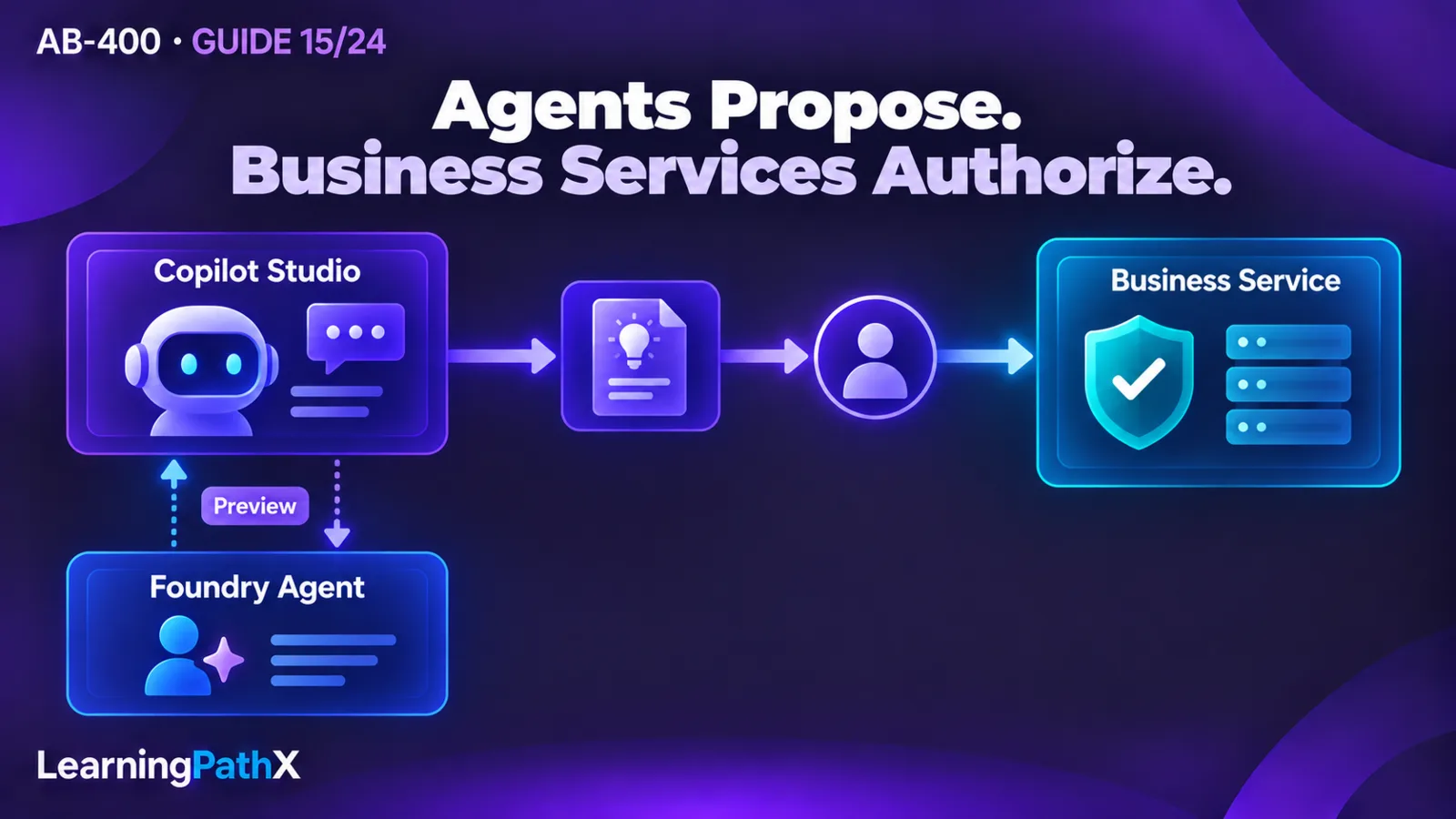
Compose Microsoft Foundry and Microsoft Copilot Studio around explicit ownership: the application owns its user session, Copilot Studio owns the conversation it orchestrates, a connected Foundry agent performs a bounded specialist task, and the business service authorizes any resulting operation. Integrating Foundry and Copilot Studio agents safely requires carrying conversation context without treating that context as permission. A fluent agent response is evidence of generated output; business success requires an independently validated operation result.
Choose the agent-building platform separately from the client connection. A custom application can consume a Copilot Studio agent through the Microsoft 365 Agents SDK; a Power Apps code app can use its generated Copilot Studio connector service. Copilot Studio can additionally call a connected Foundry agent, currently a preview capability. These are separate boundaries with separate identities and failure modes. This guide synthesizes them into a service-request assistant architecture; Model Context Protocol (MCP) and Business Applications in Work IQ access design remain the subject of AB-400: Dataverse MCP and Work IQ Access for Agents.
Architecture Overview: Integrating Foundry and Copilot Studio Agents
Consider an internal service desk application. An employee describes a damaged laptop, asks which repair route applies, and reviews a proposed service request. A specialist can interpret an ambiguous description and explain a recommended category. Creating the request requires validated fields, the employee's permitted scope, and an explicit submission decision.
The following is a recommended architecture for this example, rather than a Microsoft-provided deployment design:
| Boundary | Owned responsibility | Contract crossing the boundary |
|---|---|---|
| Application to Copilot Studio | Bind the signed-in user to one application conversation | User input, allowed context, conversation continuation and returned activities or response envelope |
| Copilot Studio to Foundry specialist | Delegate a narrowly described interpretation task | Minimum relevant request details and a bounded recommendation |
| Orchestrator to deterministic operation | Submit a reviewed proposal through an authorized service | Typed arguments, operation correlation, validation outcome and durable request identifier |
| Application to employee | Show recommendation, progress and confirmed outcome separately | Draft versus submitted state, recoverable errors and a clear next action |
The design does not require multiple agents. Add the specialist only when it has an independently useful capability and a testable interface. If both agents merely reinterpret the same request with the same instructions, the extra boundary adds latency and another opportunity for disagreement without establishing a clearer responsibility.
Decide which component should reason
Use deterministic logic when the required outcome is defined by exact conditions: mandatory fields, permitted categories, approval thresholds, record access and state transitions. Use an agent when interpreting language, asking a clarifying question or synthesizing an explanation improves the interaction. The agent may propose a category, but the operation must reject an unknown category even if the explanation sounds convincing.
For this scenario, favor Copilot Studio as the conversational entry point when its maker-managed experience is the intended orchestration surface. Favor a Foundry-built specialist when the team needs to own that specialist's code and AI implementation. This is an architectural recommendation, not a claim that one product exclusively supports a particular class of agent. The choice of where to build does not determine how a custom client authenticates or how the final service enforces policy.
Core Components and Their Contracts
The Copilot Studio client library
Microsoft's Agents SDK integration documentation supports consuming Copilot Studio from custom web or native applications and referencing it from another SDK-built agent. It provides .NET, JavaScript and Python client samples. The current client-library support is for Copilot Studio agents using the standard harness; the GitHub Copilot harness is not yet officially supported by that library. Confirm that compatibility before choosing a client package.
The implementation guidance linked from the SDK documentation uses user interactive authentication through a Microsoft Entra ID application registration and the delegated Power Platform API permission CopilotStudio.Copilots.Invoke. It currently directs scenarios requiring service principal tokens to Direct Line because that token mode is unsupported by the documented Agents SDK integration. Do not convert the interactive sample into unattended authentication merely by inserting a client secret.
Configure the intended agent using its connection string, or its documented environment, schema and tenant settings. Keep deployment configuration under application control. A user-supplied agent name, tenant or endpoint must not silently redirect an established conversation. For a browser or native public client, do not embed a confidential application secret; use the authentication model appropriate to that client and the documented supported connection path.
The Power Apps code-app connection
A code app uses a different consumption surface. Microsoft's guide requires an initialized project, a published Copilot Studio agent and an environment connection. The current Power Apps CLI can add the shared_microsoftcopilotstudio data source with pa app add data-source, using its connection ID; generated TypeScript services then expose ExecuteCopilotAsyncV2. The published agent name is case-sensitive.
That operation waits for a response despite its asynchronous-looking name. Its documented envelope includes responses, lastResponse, conversationId and completed. Inspect the generated types and actual envelope rather than assuming every successful transport response contains useful text. The guide also warns that property casing can vary. Keep any compatibility handling inside a narrow adapter rather than spreading casing alternatives through the UI.
An important continuation boundary follows: the documented code-app request parameters do not establish a general multi-turn continuation API. Receiving conversationId does not prove that the next call resumes that conversation. If continuity is a requirement, verify the selected operation's supported contract or choose the documented conversational client path. Do not invent an input parameter because a similarly named output exists.
A connected Foundry specialist in preview
The current Copilot Studio connected-Foundry feature is preview, with prerelease behavior and restricted production suitability. Microsoft's documentation requires an agent created in the new Foundry portal and an enabled Activity protocol endpoint. A new Foundry agent exposes Responses and A2A endpoints by default; Activity currently requires programmatic enablement through the documented REST API or Python SDK. Its absence can produce a runtime 400 error, and a previous-portal agent can produce 404 - Version not found. The portal may still omit Activity from its endpoint display after enablement.
Connection setup selects the Foundry project endpoint, agent ID, name and description. Describe a bounded purpose so the main agent can distinguish the specialist from other available capabilities. For example, describe laptop fault interpretation and repair-route recommendations; avoid a catch-all description inviting arbitrary tasks. Verify the project's connection separately from the specialist's response quality. Neither a valid endpoint nor successful delegation establishes authorization for a subsequent business action.
How Components Work Together Across a Conversation
Start, initialize context and continue
Treat an application conversation as a record with an owner, agent/environment binding and continuation state. These are recommended application fields, not an SDK schema. Keep the business request identifier separate: a conversation can produce several drafts, while a durable service request represents one accepted submission.
The linked .NET client sample starts a conversation with StartConversationAsync and sends later input with AskQuestionAsync. In that sample, the initialized client retains the conversation ID. Therefore, client lifetime is part of the design: a shared singleton that carries conversational state would risk mixing users, while recreating state on every turn can lose continuity. Bind state to the intended conversation and user; do not assume that preserving a chat transcript alone restores server-side context.
Microsoft's web/native integration guidance recommends an event-based approach for initial application context: after the first agent message, send a custom event and handle it in an OnEventActivity topic. For the example, send an allowed device reference and UI language. Do not put an access token or a declaration such as “user is administrator” into conversational context. Context helps the agent interpret the task; trusted authentication and downstream authorization establish authority.
A recommended sequence is:
- Authenticate the employee, resolve the configured agent and open the employee's conversation.
- Initialize the minimum context through the selected client's supported mechanism. Record whether initialization completed before accepting context-dependent requests.
- Submit the employee's message and consume the returned activities. Route message content to the conversation UI and handle other activity types intentionally; a typing activity is not an answer.
- Let Copilot Studio select the specialist only when the requested task matches its declared purpose. Send just the information required for that task.
- Validate the recommendation against the application's allowed categories and render it as a proposal. Ask for missing facts rather than fabricating a required value.
- On the employee's submission, invoke the deterministic operation with validated arguments under the intended identity. Show “submitted” only after its authoritative success result supplies a durable request identifier.
On sign-out, clear client continuation state and any locally cached conversation content according to the application's retention policy. A second employee using the same workstation must start with a different session binding. Do not allow a conversation ID supplied from a browser address or another user's request to override that binding.
Separate generated output from accepted work
Define a small application-owned proposal contract. In this example it might contain a device reference, an allowed repair category, an employee-readable explanation and an indication that clarification is needed. These are example fields, not built-in Copilot Studio response properties. Validate their types, length and permitted values before enabling submission. Parsing JSON successfully proves syntax only; it does not prove that the device exists or belongs to the employee.
Keep four states distinct in the UI and operation log: input received, recommendation available, submission requested and business operation confirmed. An agent saying “I created your request” must not advance the application to the last state without the operation result. This separation also makes recovery safer. After a lost response, determine whether the business operation completed before resubmitting it. A conversational retry must not create a second service request simply because the first confirmation was lost.
Design Considerations and Acceptance Evidence
Preserve authority at every handoff
Document the identity used by the client invocation, the connection to the specialist and the final operation. Do not assume that the employee's token is automatically forwarded across all three. For each hop, determine which principal authenticates, what permission is checked, and which user or workload is recorded as the actor. If a service connection is used downstream, its available access must still be constrained to the intended operation and the employee's authorized task.
Treat retrieved content, user messages and specialist responses as untrusted input. A sentence in a device note telling the assistant to ignore approvals must not change the operation's rules. Keep approval and validation outside the probabilistic recommendation. Do not send an entire conversation to the specialist when the fault description and a few permitted attributes suffice. Review data handling and human oversight before enabling an external agent connection.
Test the boundary contract, not identical wording
Before implementing the example, use an isolated development environment with a published test agent, the required app-registration and connection permissions, a compatible client and harness, and a preview-enabled Foundry test configuration if delegation is included. Confirm tenant availability, licensing and paid-resource costs with the owners. Use synthetic devices and service requests; these checks describe expected evidence and have not been executed against a tenant here.
| Acceptance or negative test | Expected observable result |
|---|---|
| Ask a fault question, then clarify “only while charging” in the same session | Follow-up uses the intended conversation; it does not require the employee to restate the entire fault |
| Repeat the same interaction as another employee | No prior employee transcript or device context is returned |
| Remove invocation permission or sign out | Client shows an authentication/authorization failure and does not claim an agent answer |
| Submit an invented category or another employee's device reference | Deterministic validation rejects it; no request is created |
| Ask for a request outside the specialist's declared task | The main agent clarifies or uses another allowed path; the specialist is not a universal fallback |
| Return malformed or incomplete proposal content | UI withholds submission and records a validation failure without showing fabricated defaults |
| Simulate a specialist failure or lost submission confirmation | UI distinguishes recommendation failure from uncertain business completion; recovery checks for an existing request |
Run multiple paraphrases of the fault question. Accept stable safety and contract behavior rather than identical generated sentences. Record the agent configuration and test conditions so a later model or instruction change can be evaluated against the same criteria.
For diagnosis, retain a correlation trail joining the application session, conversation, delegation attempt and business-operation identifier, while redacting tokens and sensitive text. Avoid logging full prompts by default. A successful conversational turn with a rejected operation is an expected policy outcome, not automatically an integration outage. After development testing, remove synthetic requests and unnecessary test connections, revoke unused app permissions and delete disposable paid resources under their owners' change procedures.
Common Mistakes and Failure Analysis
Check the documented Foundry endpoint and portal prerequisites before editing orchestration instructions in response to an integration error. Keep preview restrictions visible in release decisions and provide a tested fallback when delegation is unavailable.
Context loss often originates in client state management. Inspect whether the conversation was recreated, whether the initial context event was handled and whether the application switched agents or environments. Cross-user context is more serious: stop the interaction and inspect the session-to-client binding before allowing further business actions.
Another common mistake is equating transport, agent and business completion. A response envelope can arrive without an accepted proposal, and a specialist can produce a useful recommendation while the final operation correctly denies access. Report those stages separately. When a business result is uncertain, inspect durable state instead of repeatedly asking the agent to “try again.”
Certification Relevance
This architecture addresses AB-400's selected agent-integration scope through the distinction between building an agent, consuming it from an application and connecting specialists. The study scope is frozen to the October 15, 2026 verification baseline for the skills effective October 16, 2026; this article does not claim that exam availability was checked live. The useful developer outcome is the ability to explain who owns each conversation, which identity authorizes each hop and what evidence confirms a business action.
AB-400: Choosing Power Platform Extension Architectures establishes placement decisions, and AB-400: Reliable Cloud Flows and Copilot Studio Workflows explains deterministic automation. Apply those foundations here without turning every policy into an instruction that the agent may reinterpret.
Conclusion
A composable agent architecture has explicit conversation and action contracts. Choose a supported consumption path, bind continuation to the intended user, delegate a narrowly defined task and validate any resulting proposal before an authorized operation. Keep the connected Foundry preview qualified and measure success at the business service as well as the conversation. That design gives a developer a practical way to diagnose failures and demonstrate that an assistant's recommendations remain within the application's authority.
Authoritative Sources
- AB-400 study guide
- Connect code apps to Copilot Studio
- Connect to a Microsoft Foundry agent (preview)
- Integrate with Copilot Studio using the Agents SDK