
Expose an authenticated external API through a Power Platform custom connector by reviewing its OpenAPI contract, importing a controlled definition into a development solution, matching the connector's authentication to the API, and adding only the adaptation that consumers need. Test the resulting operation through a real connection, including rejected credentials and backend failures, before making it a dependency of an app or flow. Keep the definition, connector properties, transformation code, and test expectations together under source control.
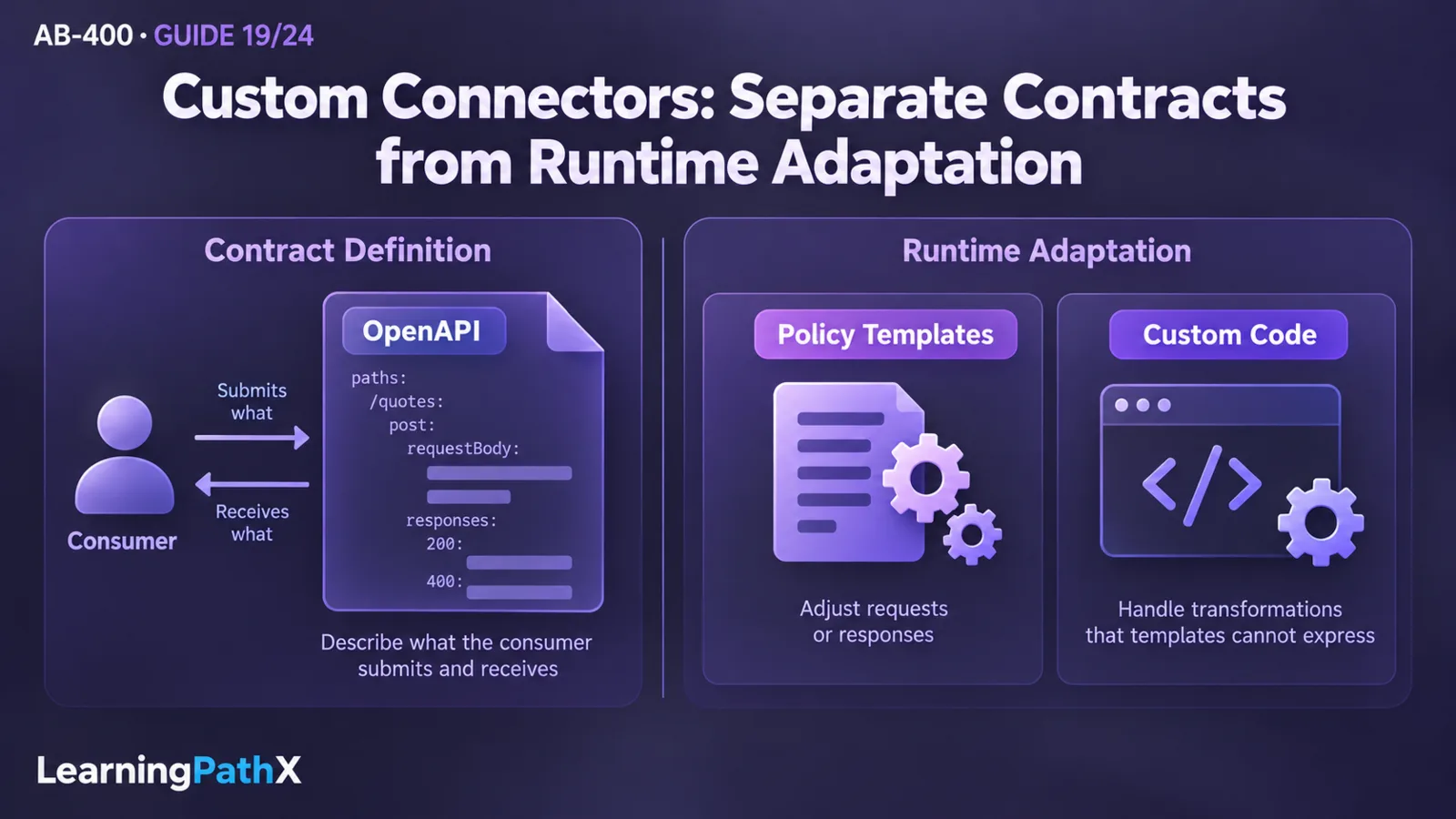
Custom connectors with OpenAPI, policies and code have three distinct responsibilities: OpenAPI describes the consumer contract, policy templates adjust runtime requests or responses, and custom code handles transformations that templates cannot express. The backend remains responsible for authentication enforcement, authorization and business behavior. The procedure below uses an original, read-only repair-quote example backed by an HTTP-triggered Azure Function. Its examples and expected results are design fixtures; no tenant deployment, compilation or successful invocation is claimed here.
Architecture and prerequisites
The request path is app or flow → connector connection → connector adaptation → authenticated API → Azure Function. If Azure API Management fronts the Function, the connector calls that public API contract instead. Host, path and credentials must describe the same hop: importing a gateway definition while configuring a direct Function key is a configuration mismatch.
The quote operation accepts an asset identifier and estimated work hours, then returns a quotation without submitting a repair order. Choosing a read-only operation makes the first integration easier to inspect without creating business records. That property belongs to this example's backend contract; naming an action “Get” does not make an arbitrary API safe to retry.
Before starting, arrange:
- A development Power Platform environment, a solution and permission to create custom connectors and connections. Confirm the intended users' entitlements and applicable data policies with the administrator.
- An isolated Azure API endpoint and an owner who can provide its approved contract and test credentials. Azure resources can incur charges. Use fictional asset data and a dedicated test key.
- A source-controlled working copy containing the definition, connector properties, optional script and a short deployment/test record. Keep live credentials outside these files.
- Backend test fixtures for valid quotes, invalid inputs, authentication rejection and service failure. The API owner must implement these responses; an OpenAPI response declaration does not create them.
Microsoft's data policies govern custom connector use as well as other connector interactions. Establish whether the intended app or flow can combine this connector with its other data sources before debugging API payloads. A policy restriction and an API authorization denial require different owners and remedies.
1. Review and import a controlled OpenAPI definition
Start from the API owner's released definition, an Azure-backed API export, or a reviewed definition held in GitHub. Microsoft's PowerPlatformConnectors repository contains connector definitions and examples of accompanying properties files. Use it to understand a supported connector structure, then verify the selected definition against the API you actually own or are authorized to use.
For a GitHub-sourced file, record the repository, file path and exact commit in your internal deployment record. Review the downloaded JSON locally: check host/base path, operations, authentication, response schemas and any external dependencies. Review the associated properties and script separately. Importing the OpenAPI file does not establish that a repository's policies or code have also been installed. Downloading a reviewed file and using the documented file import is sufficient; this procedure relies on no special GitHub import button.
The documented import requires OpenAPI 2.0 and a definition smaller than 1 MB; OpenAPI 3.0 is not accepted by that flow. If an Azure API Management export offers several formats, select or deliberately adapt the export to this requirement and compare it with the deployed route. Preserve an unmodified export for comparison. In this example, the direct Function route joins the api base-path segment and the repair-quotes operation segment; a gateway route may differ.
In Power Apps or Power Automate, open the development solution, select New > Automation > Custom connector, then Import an OpenAPI file. Name the connector and select the reviewed file. In the designer, inspect General, Security and Definition, resolve reported validation issues, then save. Do not accept imported values merely because parsing succeeded.
Define the operation consumers should see
For the example, agree this contract with the API owner before importing:
| Contract element | Deliberate example value | Why it matters |
|---|---|---|
| HTTP method and route | POST; quote route shown in the definition excerpt | An HTTP-triggered Function implements the quote calculation. |
| Stable operation identifier | GetRepairQuote | Apps and flows bind to this connector operation. |
| Required request | assetId: string; estimatedHours: integer from 1 to 8 | Backend validation rejects missing or out-of-range values. |
| Consumer success | HTTP 200 with quoteId, estimatedCost, currency | The connector exposes a flat object for downstream expressions. |
| Backend success | HTTP 200 with those fields inside result | The script below bridges this deliberate schema difference. |
| Controlled failures | 400 invalid input; 401 invalid key; 503 service unavailable | Failures remain failures through the connector. |
This excerpt shows the relevant OpenAPI 2.0 operation structure. It belongs inside a reviewed document that also defines its actual host, base path, transport and security. It is not a standalone import file:
paths:
/repair-quotes:
post:
operationId: GetRepairQuote
summary: Calculate a repair quote
parameters:
- name: body
in: body
required: true
schema:
type: object
required: [assetId, estimatedHours]
properties:
assetId:
type: string
x-ms-summary: Asset identifier
estimatedHours:
type: integer
minimum: 1
maximum: 8
x-ms-summary: Estimated work hours
responses:
'200':
description: Calculated quote
schema:
$ref: '#/definitions/RepairQuote'
'400':
description: Invalid quote request
'401':
description: Authentication rejected
'502':
description: Backend success violated the quote contract
'503':
description: Quote service unavailable
definitions:
RepairQuote:
type: object
required: [quoteId, estimatedCost, currency]
properties:
quoteId:
type: string
estimatedCost:
type: number
currency:
type: string
enum: [USD]
Here the document's base-path segment is api, so its operation path supplies only the repair-quotes segment; duplicating api in both would call the wrong endpoint. RepairQuote describes the transformed consumer response, not the nested backend response. Use descriptions and the documented x-ms-summary extension to clarify parameters. Avoid changing field types or renaming a released operationId as a cosmetic edit: existing consumers may depend on them. Extend a released connector with a compatible optional field or a new operation when the old contract must remain usable.
2. Bind authentication to the intended API boundary
For this isolated example, use the Function's function-level key authentication. The Azure Functions/OpenAPI integration tutorial demonstrates a function key named code in the query string. Configure the connector's API key authentication with that parameter name and location, then enter the test key when creating the connection. Never place the key in the OpenAPI host, a request example, source control or a literal policy value.
A key proves possession of a shared credential. It does not identify each app user or automatically enforce per-user access to individual assets. Restrict the demonstration endpoint to fictional data. For an API that requires user-specific authorization, select a supported OAuth 2.0 configuration, preferably Microsoft Entra ID where appropriate, and have the API enforce the intended permissions. Match the API's registration and scope requirements rather than copying Dataverse registration values into an unrelated API. A Function's downstream Dataverse identity is another trust boundary; the incoming connector connection does not automatically supply it.
For OAuth connectors, use the connector's generated per-connector redirect URI in the identity application's registration. Do not reuse an old global redirect value. The documented OpenAPI import also does not support OAuth client credentials; a service-to-service Dataverse client pattern is not evidence that this connector import supports the same flow.
On the connector's Test page, create a new connection using the intended authentication method. A saved connector definition and a working connection are separate artifacts. If key-backed testing immediately after creation fails, allow the documented provisioning delay and retry once configuration is ready; do not replace authentication with anonymous access to make the test pass.
3. Use policy templates for small runtime adjustments
Suppose the API owner requires the nonsecret query parameter api-version=2026-01-01. This is an illustrative contract value, not a Microsoft service version. Add it centrally so each app does not have to supply the same constant.
In the designer's Definition page, select New Policy, choose the query-parameter template and set the parameter name, approved value and override behavior. Save the connector. The corresponding properties fragment follows the structure documented in Microsoft's connector repository:
{
"policyTemplateInstances": [
{
"title": "Quote API version",
"templateId": "setqueryparameter",
"parameters": {
"x-ms-apimTemplateParameter.name": "api-version",
"x-ms-apimTemplateParameter.value": "2026-01-01",
"x-ms-apimTemplateParameter.existsAction": "override"
}
}
]
}
This fragment sits within the properties object of a connector properties file; it is not an OpenAPI path or a complete deployment package. This connector has one operation. Before adding others, review whether this policy should apply to them and test each affected request. Verify at the backend that the required parameter arrives with the expected value and no duplicate conflicting value.
A connector policy is an adaptation mechanism, not the backend's authorization system. Keep business permission checks on the API. Environment-variable expressions in custom connector policies are documented as preview; the fixed nonsecret fixture above avoids making that preview capability a prerequisite.
4. Add code only for the missing transformation
The backend's example success is:
{
"result": {
"quoteId": "Q-204",
"estimatedCost": 375.00,
"currency": "USD"
}
}
The connector should expose only the inner quote object. Custom code implements Script : ScriptBase and ExecuteAsync, and forwards through Context.SendAsync. Code takes precedence over the codeless definition, so do not assume a separately configured policy automatically produces the same request once code is enabled. Test the combined behavior, including the version parameter, against the backend.
The following original script is for this single-operation connector. It preserves non-200 responses, validates the success shape, and creates a controlled 502 if the backend claims success without the agreed contract. Returning an empty quotation with status 200 would conceal the defect from the consuming flow.
using System;
using System.Net;
using System.Net.Http;
using System.Threading.Tasks;
using Newtonsoft.Json;
using Newtonsoft.Json.Linq;
public class Script : ScriptBase
{
public override async Task<HttpResponseMessage> ExecuteAsync()
{
var response = await this.Context.SendAsync(
this.Context.Request, this.CancellationToken)
.ConfigureAwait(false);
if (response.StatusCode != HttpStatusCode.OK)
return response;
try
{
if (response.Content == null)
return InvalidQuote(response);
var text = await response.Content.ReadAsStringAsync()
.ConfigureAwait(false);
var quote = JObject.Parse(text)["result"] as JObject;
var id = quote?["quoteId"];
var cost = quote?["estimatedCost"];
var currency = quote?["currency"];
if (id?.Type != JTokenType.String ||
String.IsNullOrWhiteSpace((string)id) ||
cost == null ||
(cost.Type != JTokenType.Integer &&
cost.Type != JTokenType.Float) ||
currency?.Type != JTokenType.String ||
(string)currency != "USD")
return InvalidQuote(response);
var amount = cost.Value<decimal>();
if (amount < 0)
return InvalidQuote(response);
response.Content = CreateJsonContent(new JObject
{
["quoteId"] = (string)id,
["estimatedCost"] = amount,
["currency"] = (string)currency
}.ToString());
return response;
}
catch (JsonException) { return InvalidQuote(response); }
catch (FormatException) { return InvalidQuote(response); }
catch (OverflowException) { return InvalidQuote(response); }
}
private HttpResponseMessage InvalidQuote(HttpResponseMessage original)
{
original.Dispose();
return new HttpResponseMessage(HttpStatusCode.BadGateway)
{
Content = CreateJsonContent(new JObject
{
["code"] = "BackendContractMismatch",
["message"] = "The quote service returned an invalid success payload."
}.ToString())
};
}
}
Use the documented Code support to upload or paste the script and enable it for the quote operation, then save. Compile it locally against Microsoft's documented supporting interfaces and allowed namespaces before tenant testing; no local compilation is claimed for this article. Record the script revision alongside the definition. Before introducing additional operations, introduce deliberate dispatch and tests rather than applying quote validation to unrelated responses. Microsoft documents a regional issue in which the operation identifier can be base64 encoded, which must be accounted for if dispatch relies on it.
The documented custom-code constraints include one script file, .NET Standard 2.0, a file size no greater than 1 MB and execution within two minutes. These are ceilings, not suitable latency targets for an interactive quote. Keep extensive computation and dependencies in the Function. Custom code also has documented gateway and private-endpoint restrictions; do not infer that Context.SendAsync reaches a private Function merely because the Power Platform environment is linked to a virtual network.
5. Integrate the Azure Function and verify the complete operation
Implement the Function against the agreed request and nested-response contract, using an HTTP trigger. Keep its responsibilities narrow: reject invalid hours, enforce access, calculate or retrieve a quotation and emit controlled errors. Use the Function's OpenAPI support to describe its actual backend responses. The connector's flattened response is a separate adaptation contract, so retain both definitions in the review record.
If using API Management, import the Function's OpenAPI document, test that API independently, and export the connector-facing definition in a supported format. The documented tutorial demonstrates API Management supplying a Function key to its backend. In that arrangement, keep the backend credential at the gateway and configure the connector for the gateway's own authentication contract. Do not accidentally expose the backend key as an input on every app operation.
First establish that the hosted API succeeds and rejects missing credentials independently of the connector. The Microsoft tutorial notes that local Function testing does not require access keys; a successful local request therefore does not prove hosted authentication. Then select the intended connection on Test, provide assetId and estimatedHours, and run Test operation. Finally call the operation from a small development flow or app and inspect the fields consumers actually receive.
Use the following acceptance matrix as a specification. Arrange controlled backend fixtures instead of disrupting a shared service. All results below are expected outcomes to record during your deployment, not results executed for this article.
| Test | Expected observable evidence | Failure implication |
|---|---|---|
| Valid asset, hours 3, valid key | HTTP 200; flat quote fields; no outer result; amount matches the agreed backend fixture | A nested response suggests code is disabled or the wrong connector revision is in use. |
| Missing or revoked key | Authentication rejection; no quote data returned | Successful quote access indicates a backend or gateway security defect. |
| Hours 0 or a missing asset identifier | Controlled 400 from the API, retained through the connector | Schema declarations alone have not established backend enforcement. |
| API owner returns controlled 503 | 503 remains visible; consuming flow follows its failure path | A 200 indicates transformation code is masking failure. |
| HTTP 200 with result missing, a string cost, or non-USD currency | Controlled 502 with BackendContractMismatch | The backend and connector contracts disagree. |
| Required version parameter | Backend evidence shows the agreed single query value with code enabled | Recheck policy scope and code precedence before adding more policies. |
| Unapproved connector/data-source combination | Platform governance prevents the prohibited use | Resolve the policy design with the administrator; changing a payload cannot fix it. |
Capture connector revision, script revision, connection identity, test input, actual status, output shape and a backend correlation reference where available. Redact credentials and query strings containing keys. Compare the final flow/app behavior with the connector Test result: a consumer still bound to an older operation schema can fail even when the latest connector test succeeds.
Design considerations and common mistakes
Maintain one owner for each transformation. If both the gateway and connector flatten result, the second transformation can turn a valid quote into a contract failure. If both the policy and each caller set the version parameter, requests may vary by consumer. Choose the responsible layer explicitly and verify the wire contract at that boundary.
Do not use a large imported definition as the initial consumer surface when only one operation is required. Review the needed operation, preserve the upstream definition for provenance, and deliberately remove unused operations from your own connector variant. Future imports must be compared with that variant rather than blindly replacing it. Record consumer-impacting changes, including required parameters, error behavior and authentication changes, before rollout.
Do not interpret a shared connector as a shared credential or a grant of backend authorization. Validate the actual connection used by each consuming workload. Likewise, a valid API key cannot override a platform data policy, and an allowed connector cannot grant an asset permission that the API denies.
After testing, remove disposable flows/apps and connections, revoke the test key, and remove the development connector when no longer needed. Delete Azure resources only after confirming they belong exclusively to this exercise. Retain sanitized definitions, script, provenance and actual test evidence so another maintainer can reproduce the decision without retaining secrets.
Certification relevance and conclusion
This procedure applies the connector boundary within Develop integrations: describe a usable operation, adapt an existing definition, bind authentication, apply a policy and transform data while retaining failure semantics. The selected AB-400 scope is the skills measured effective October 16, 2026, verified against the frozen October 15 baseline; it does not establish that an exam launch was observed. Product documentation was rechecked on October 16, 2026.
A maintainable custom connector is a tested agreement between consumers and an API owner. Its source-controlled contract explains what callers submit and receive, its connection supplies the intended credential, and its smallest necessary adaptation makes backend behavior usable without hiding security or service failures.
Authoritative Sources
- Data policies
- Use OAuth authentication with Microsoft Dataverse
- Azure Functions overview
- Create a custom connector from an OpenAPI definition
- Custom connector policy overview
- Use custom code in a custom connector
- Custom connectors overview
- Create serverless APIs with Azure Functions and API Management
- Microsoft Power Platform connector definitions on GitHub