
Introduction
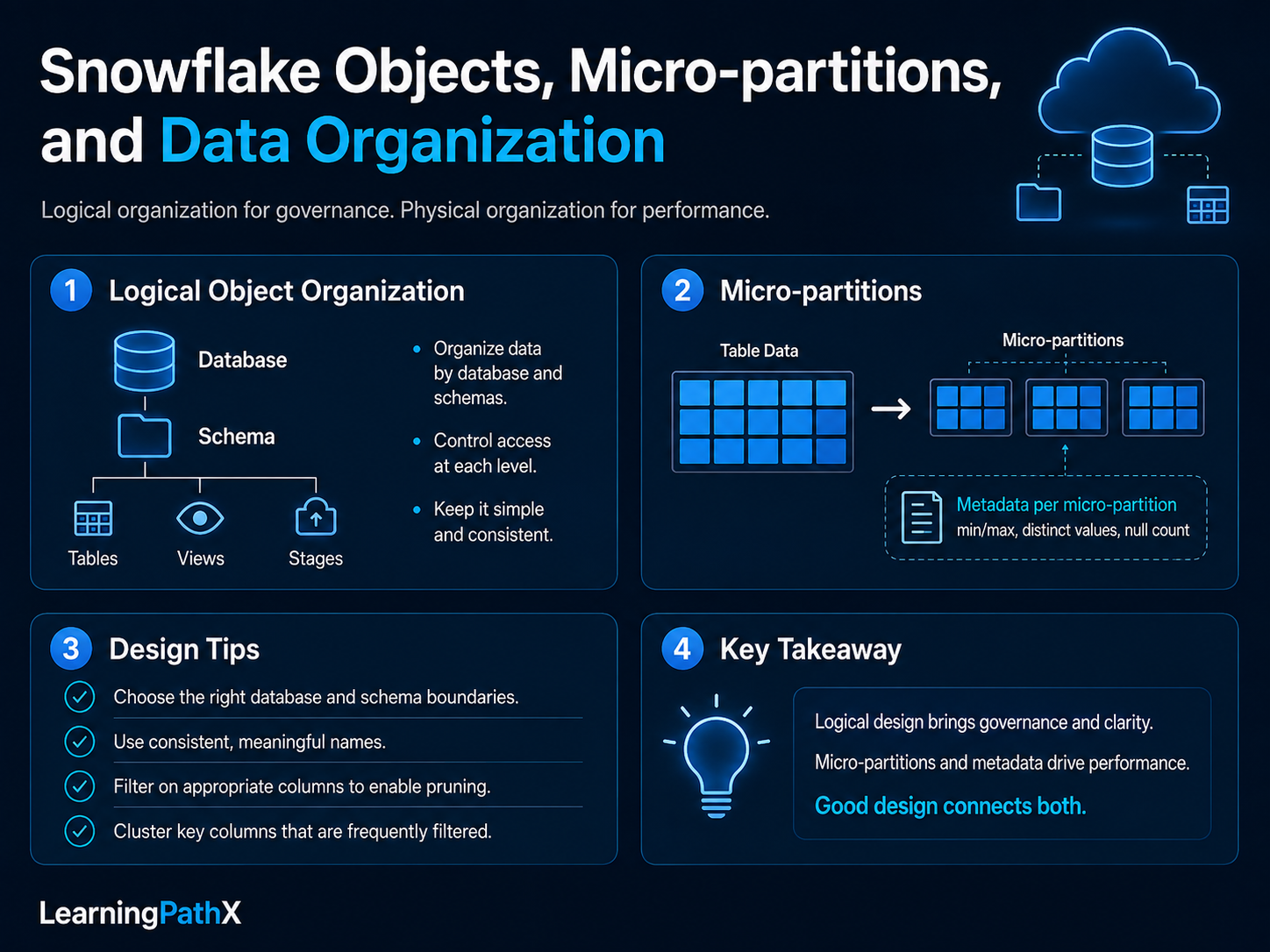
Snowflake data organization has two connected views. Users work with logical objects such as databases, schemas, tables, and views. Snowflake stores standard table data physically in compressed, columnar micro-partitions and maintains metadata that supports pruning. Understanding both views explains why object design affects governance while data organization affects scan efficiency.
Logical Object Organization
A Snowflake database is a securable container for schemas. A schema groups objects such as tables, views, stages, file formats, streams, and tasks. Fully qualified object names normally follow the database.schema.object pattern, while session context can supply the current database and schema.
Tables persist data. Views store query definitions rather than independent copies of all result rows, subject to the behavior of the specific view type. Access control can be applied at container and object levels, so logical organization should reflect ownership and governance needs rather than only naming preference.
Physical Table Organization
Automatic micro-partitioning
Snowflake automatically divides standard table data into contiguous micro-partitions. The current documentation describes a typical micro-partition as containing 50 MB to 500 MB of uncompressed data; the stored representation is compressed. Users do not create or address individual micro-partitions.
Within micro-partitions, columns are stored independently. Snowflake records metadata including value ranges and distinct-value information. The optimizer uses this metadata to exclude micro-partitions that cannot contain required rows and to scan only referenced columns.
Pruning
Suppose a large events table is loaded roughly in timestamp order. A query restricted to a narrow timestamp range may allow Snowflake to prune micro-partitions whose recorded ranges fall entirely outside the predicate. If relevant values are spread across many overlapping micro-partitions, more data must be scanned.
Pruning is evidence-driven. Query Profile can show partitions scanned and total partitions, but one query is not enough to justify a permanent clustering strategy. Workload frequency, latency requirements, maintenance cost, and alternative optimizations all matter.
Natural and explicit clustering
The order in which data arrives can create useful natural clustering. As update patterns change, value ranges may overlap more deeply. Snowflake supports clustering keys and Automatic Clustering for selected tables, but explicit clustering consumes resources and is normally most useful for large tables with repeated selective access patterns.
Clustering depth is an indicator of overlap, not an absolute performance score. If current queries meet their objectives, a theoretical clustering improvement may not justify additional cost.
How Logical and Physical Design Interact
Logical design answers questions such as who owns an object, which role may use it, and how applications reference it. Physical organization answers which data must be scanned to execute a query.
For example, moving a table to a different schema changes its namespace and potentially its grants. It does not directly reorganize its micro-partitions. Conversely, defining a clustering key affects ongoing physical organization but does not replace database and schema governance.
Transient and temporary table types also change lifecycle and data-protection behavior. Table type, retention settings, and edition capabilities should be selected from current requirements rather than inferred from the object name.
Design Considerations
- Choose database and schema boundaries for ownership, lifecycle, access, and deployment management.
- Use consistent fully qualified names in automation where session context could be ambiguous.
- Filter on appropriate typed columns so predicates can support pruning.
- Inspect actual Query Profile evidence before adding a clustering key.
- Test data-model changes with representative distributions and query patterns.
- Verify feature support for standard, Iceberg, hybrid, transient, and temporary tables separately.
Common Mistakes
- Treating a database or schema as a physical storage device.
- Trying to define micro-partitions manually.
- Assuming all predicates prune equally well regardless of type conversion or expression design.
- Adding clustering to every table without measuring benefit and maintenance cost.
- Interpreting clustering depth as a guaranteed latency result.
- Applying standard-table behavior to other table types without checking documentation.
Certification Relevance
COF-C03 includes the Snowflake architecture, multiple data categories, and performance optimization. The connecting skill is to explain how logical objects map to managed storage and how metadata enables pruning without confusing automatic micro-partitioning with user-managed static partitions.
Authoritative Sources
- Understanding Snowflake table structures
- Micro-partitions and data clustering
- Snowflake key concepts and architecture
Conclusion
Snowflake object hierarchy and physical table organization solve different problems. Databases and schemas provide naming, ownership, and governance boundaries; micro-partitions provide managed columnar storage and pruning metadata. Sound design respects both layers and changes physical organization only when workload evidence supports it.